Marking Guide articles with labels, how Support content is handled, and what happens at delivery
For knowledge authors and administrators.
Requesting translation of a Guide article
1
Open Article settings
2
Add the translation-ready label
The label is translation-ready.
3
Add the language labels
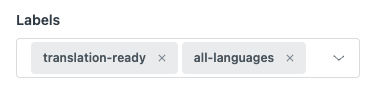
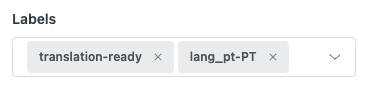
For all configured languages, add all-languages or all_languages. Prefer all_languages, because of a Zendesk API issue.For specific languages, add lang_<language_code> labels, using Zendesk language codes.
All configured languages
Or one language at a time
4
Add a service type label, optional
Either st_<name> or st-<name>.
If the article is new and still a draft, publish it after the first translation. Otherwise the previously published version is ingested rather than what you are looking at.
What the connector does at intake
Sends the title and body, and the categories and sections if applicable
Removes the translation-ready label
Removes existing tos_translated_<language> labels for the requested languages
Adds lang_<language>_in_progress for each valid language
For an invalid language, adds error_<language> and fails that language
Check these labels after the next poll. The known Zendesk label issue means some requested languages may not be picked up, and the in-progress labels are how you find out.
Support dynamic content
Dynamic content is handled continuously. There is no per-item selection.New content. The default-language content, which may differ from the Admin Center default, goes to all other languages. Placeholder variants are created as Inactive, using the in-progress label from the connector configuration.Edits to the default variant are not detected during translation. Finish your edits first, or set the item to Inactive while drafting.Modified content. Zendesk marks the other variants as Active (Out of date) but keeps serving them. The connector picks these up, sends them for translation, and adds a trailing space so they are not ingested again.
Receiving translations
Guide. Translations arrive as draft Zendesk translations, with their associated categories and sections. The lang_<language>_in_progress labels are removed, and tos_translated_<language> labels may be added if enabled.Support. The variant content is updated and set to Active, so Zendesk uses it.If you delete a delivered variant, the source is sent again for that language. To stop that, set the variant to Inactive instead of deleting it.
Cancelling
Requests still in the queue can be cancelled on the TranslationOS dashboards. Everything else goes through your project manager.
Troubleshooting
Some requested languages were not picked up
This is the known Zendesk label issue: the API often returns incomplete labels. Delete the labels for the missed languages and add them again.
An article was ingested in an old version
It was a draft, so the previously published version was used. Publish first.
A language label produced an error
Look for error_<language>. The code is not valid for the connector. See Language codes.
A service type label produced an error
The name is not valid. The article is not ingested, the label becomes error_<name>, and translation-ready is removed, so you have to reapply it after fixing the name.
A deleted translation keeps coming back
Deleting a delivered variant makes the source resend. Set it to Inactive instead.
FAQ
How do I choose a service type for one article?
Add an st_<name> or st-<name> label. Categories and sections always use the default, and Support content always uses the connector default.
Can we select individual dynamic content items?
No. Support dynamic content gets continuous localisation only.
Are images and links translated?
Images and URLs are preserved, and image alt text is translated. Swapping in localised assets and adapting URLs are not supported.
How do we know an out-of-date variant is being translated?
Zendesk shows no indicator. Check the TranslationOS dashboards.
Where do I find my tracking IDs?
Content
Content ID
Order ID
Order group ID
Articles
Article ID
Article
Guide
Sections
Section ID
Section
Guide
Categories
Category ID
Category
Guide
Dynamic content
Item ID
Dynamic
Support
{"docsConfig":{"theme":"mint","$schema":"https://mintlify.com/docs.json","name":"TranslationOS","colors":{"primary":"#2985EC","light":"#94C5FE","dark":"#0055B8"},"logo":{"light":"https://mintcdn.com/translated/A02MktdeiyJy_IDR/logo/translationos-help-light.png?fit=max\u0026auto=format\u0026n=A02MktdeiyJy_IDR\u0026q=85\u0026s=3b0464b16c152c0abfc72c2f24658c24","dark":"https://mintcdn.com/translated/A02MktdeiyJy_IDR/logo/translationos-help-dark.png?fit=max\u0026auto=format\u0026n=A02MktdeiyJy_IDR\u0026q=85\u0026s=bb054a81131ba466f71d9e3623ac5668","href":"/"},"favicon":{"light":"https://mintcdn.com/translated/rjYQ9-wgKIB21Erw/favicon.png?fit=max\u0026auto=format\u0026n=rjYQ9-wgKIB21Erw\u0026q=85\u0026s=49e26f94b6b943273a3dfb9f46ac80de","dark":"https://mintcdn.com/translated/rjYQ9-wgKIB21Erw/favicon-dark.png?fit=max\u0026auto=format\u0026n=rjYQ9-wgKIB21Erw\u0026q=85\u0026s=0f36351171cd8606b04210f40c8d3d51"},"appearance":{"default":"system","strict":false},"background":{"color":{"light":"#FFFFFF","dark":"#161618"}},"navbar":{"primary":{"type":"button","label":"Open TranslationOS","href":"https://os.translated.com"}},"footer":{"socials":{"website":"https://translated.com","linkedin":"https://www.linkedin.com/company/translated"}},"fonts":{"heading":{"family":"Inter","weight":600},"body":{"family":"Inter"}},"styling":{"eyebrows":"section","codeblocks":{"theme":{"light":"github-light","dark":"github-dark"}},"latex":false},"integrations":{"posthog":{"apiKey":"phc_sXLZBnf2hsgtJDJp5pUbR4ebMMxDk6m7Gg4H5p2pHaCE","apiHost":"https://os-ba.translated.com","sessionRecording":true}},"navigation":{"global":{"anchors":[{"anchor":"API reference","icon":"code","href":"https://api.translated.com/v2"},{"anchor":"Support","icon":"life-ring","href":"https://support.os.translated.com/"}]},"pages":[]}},"deployment":{"deploymentMetadataValue":{"subdomain":"translated","hasAudioNarration":false,"actualSubdomain":"translated","customDomains":["help.os.translated.com"],"gitSource":{"type":"github","owner":"translated","repo":"enterprise-product","deployBranch":"main","contentDirectory":"","isPrivate":true,"mountPath":"","label":"","_id":"6afe0f347fc61c3a7233ce61"},"entitlements":{"AI_CHAT":{"status":"ENABLED"},"WEB_MCP":{"status":"ENABLED"},"NARRATION":{"status":"ENABLED"}},"buildId":"6b05bbece6cf07776d988517","clientVersion":"0.0.4304","searchFilterCounts":[{"language":"default","tag":"Connectors","count":63},{"language":"default","tag":"Documentation","count":24},{"language":"default","tag":"Content management systems","count":15},{"language":"default","tag":"Translation management","count":12},{"language":"default","tag":"Marketing and messaging","count":12},{"language":"default","tag":"Support and service","count":9},{"language":"default","tag":"The platform","count":9},{"language":"default","tag":"Design and forms","count":7},{"language":"default","tag":"Start here","count":7},{"language":"default","tag":"About connectors","count":5}],"searchSettings":{"fullPageSearch":true,"showContentSnippets":true,"isFiltersEnabled":true}},"assistantConfig":{"enableAskAiButton":false,"enableStarterQuestions":false,"enableContextualStarterQuestions":false,"enableAskAiSearchBar":true},"basePath":"","hasChatPermissions":false,"hasWebMcpPermissions":true,"toggles":[{"name":"kill-isr","enabled":true,"variant":{"name":"disabled","enabled":false,"feature_enabled":true},"impressionData":false},{"name":"custom-rbac-roles","enabled":true,"variant":{"name":"disabled","enabled":false,"feature_enabled":true},"impressionData":false},{"name":"agent-mintlify-slack","enabled":true,"variant":{"name":"disabled","enabled":false,"feature_enabled":true},"impressionData":false},{"name":"agent-integrations-settings","enabled":true,"variant":{"name":"disabled","enabled":false,"feature_enabled":true},"impressionData":false},{"name":"rbac-expansion","enabled":true,"variant":{"name":"disabled","enabled":false,"feature_enabled":true},"impressionData":false},{"name":"automations-pr-grouping","enabled":true,"variant":{"name":"disabled","enabled":false,"feature_enabled":true},"impressionData":false},{"name":"custom-prefix","enabled":true,"variant":{"name":"disabled","enabled":false,"feature_enabled":true},"impressionData":false},{"name":"analytics-v7","enabled":true,"variant":{"name":"disabled","enabled":false,"feature_enabled":true},"impressionData":false},{"name":"user-flows-analytics","enabled":true,"variant":{"name":"disabled","enabled":false,"feature_enabled":true},"impressionData":false},{"name":"no-publish-flow","enabled":true,"variant":{"name":"disabled","enabled":false,"feature_enabled":true},"impressionData":false},{"name":"snapshot-serving-live","enabled":true,"variant":{"name":"disabled","enabled":false,"feature_enabled":true},"impressionData":false},{"name":"stripTemperatureMiddleware","enabled":true,"variant":{"name":"disabled","enabled":false,"feature_enabled":true},"impressionData":false},{"name":"support-platform-pylon-zendesk","enabled":true,"variant":{"name":"disabled","enabled":false,"feature_enabled":true},"impressionData":false},{"name":"snapshot-serving","enabled":true,"variant":{"name":"disabled","enabled":false,"feature_enabled":true},"impressionData":false},{"name":"instant-rollback","enabled":true,"variant":{"name":"disabled","enabled":false,"feature_enabled":true},"impressionData":false},{"name":"granular-notifications-server","enabled":true,"variant":{"name":"disabled","enabled":false,"feature_enabled":true},"impressionData":false},{"name":"granular-notifications","enabled":true,"variant":{"name":"disabled","enabled":false,"feature_enabled":true},"impressionData":false},{"name":"automations-fable","enabled":true,"variant":{"name":"disabled","enabled":false,"feature_enabled":true},"impressionData":false},{"name":"fixed-ai-action-pricing","enabled":true,"variant":{"name":"disabled","enabled":false,"feature_enabled":true},"impressionData":false},{"name":"site-roles","enabled":true,"variant":{"name":"disabled","enabled":false,"feature_enabled":true},"impressionData":false},{"name":"automation-resolve-merge-conflict","enabled":true,"variant":{"name":"disabled","enabled":false,"feature_enabled":true},"impressionData":false},{"name":"scoped-publishing","enabled":true,"variant":{"name":"disabled","enabled":false,"feature_enabled":true},"impressionData":false},{"name":"mintql","enabled":true,"variant":{"name":"disabled","enabled":false,"feature_enabled":true},"impressionData":false},{"name":"page-level-analytics","enabled":true,"variant":{"name":"disabled","enabled":false,"feature_enabled":true},"impressionData":false},{"name":"editor-version-history-v2","enabled":true,"variant":{"name":"disabled","enabled":false,"feature_enabled":true},"impressionData":false},{"name":"billing-page-v2","enabled":true,"variant":{"name":"disabled","enabled":false,"feature_enabled":true},"impressionData":false},{"name":"full-page-search","enabled":true,"variant":{"name":"disabled","enabled":false,"feature_enabled":true},"impressionData":false},{"name":"workspace-projects","enabled":true,"variant":{"name":"disabled","enabled":false,"feature_enabled":true},"impressionData":false},{"name":"fork-pr-previews","enabled":true,"variant":{"name":"disabled","enabled":false,"feature_enabled":true},"impressionData":false},{"name":"revalidation-jwt","enabled":true,"variant":{"name":"disabled","enabled":false,"feature_enabled":true},"impressionData":false},{"name":"hobby-abuse-scan","enabled":true,"variant":{"name":"disabled","enabled":false,"feature_enabled":true},"impressionData":false},{"name":"dashboard-inbox","enabled":true,"variant":{"name":"disabled","enabled":false,"feature_enabled":true},"impressionData":false},{"name":"turbopuffer-dual-write","enabled":true,"variant":{"name":"disabled","enabled":false,"feature_enabled":true},"impressionData":false},{"name":"approve-review-flow","enabled":true,"variant":{"name":"disabled","enabled":false,"feature_enabled":true},"impressionData":false},{"name":"editor-metadata","enabled":true,"variant":{"name":"disabled","enabled":false,"feature_enabled":true},"impressionData":false},{"name":"sso-setup-deadline-banner","enabled":true,"variant":{"name":"disabled","enabled":false,"feature_enabled":true},"impressionData":false},{"name":"turbopuffer-serve","enabled":true,"variant":{"name":"disabled","enabled":false,"feature_enabled":true},"impressionData":false},{"name":"live-agents","enabled":true,"variant":{"name":"disabled","enabled":false,"feature_enabled":true},"impressionData":false},{"name":"starter-pricing","enabled":true,"variant":{"name":"treatment","enabled":true,"payload":{"type":"string","value":"treatment"},"feature_enabled":true},"impressionData":false},{"name":"llms-txt-v2","enabled":true,"variant":{"name":"disabled","enabled":false,"feature_enabled":true},"impressionData":false},{"name":"wildcard-email-auth","enabled":true,"variant":{"name":"disabled","enabled":false,"feature_enabled":true},"impressionData":false}],"googleFontsInlined":false},"customCss":[{"filePath":"style.css","content":".tos-hero{background-image:linear-gradient(118deg, #0D02FC 0%, #0F43FB 45%, #029CFF 100%)}.tos-searchbox{box-shadow:0 10px 30px rgba(0, 12, 52, 0.18);transition:transform 120ms ease, box-shadow 120ms ease}.tos-searchbox:hover{transform:translateY(-1px);box-shadow:0 14px 36px rgba(0, 12, 52, 0.24)}html[data-current-path=\"/\"] #search-bar-entry{display:none}html.dark .tos-hero{background-image:linear-gradient(118deg, #0A17A8 0%, #0C31B0 45%, #0A72B0 100%)}html.dark .tos-searchbox{background:rgba(33, 33, 36, 0.80);color:#c9cdd4;box-shadow:0 10px 30px rgba(0, 0, 0, 0.35);backdrop-filter:blur(6px)}html.dark .tos-searchbox span{border-color:#3A3A40;color:#BDBDC3}html.dark main img{filter:brightness(0.9) contrast(0.98)}:root{--gray-50: 247 247 247;--gray-100: 238 238 239;--gray-200: 222 222 225;--gray-300: 189 189 195;--gray-400: 172 172 179;--gray-500: 151 151 159;--gray-600: 110 110 119;--gray-700: 58 58 64;--gray-800: 45 45 48;--gray-900: 33 33 36;--gray-950: 9 9 10}#sidebar,#navbar{background-color:rgb(var(--gray-50))}#sidebar{border-right:1px solid rgb(var(--gray-200))}html.dark #sidebar,html.dark #navbar{background-color:#09090a}html.dark #sidebar{border-right-color:#2d2d30}.card{background-color:rgb(var(--gray-50));border-color:rgb(var(--gray-200))}html.dark .card{background-color:#212124;border-color:#3a3a40}html.dark .accordion{background-color:#212124}.card,.accordion,.accordion-group,figure.frame{border-radius:0.75rem}pre{border-radius:0.625rem}html.dark .prose :where(p,li,td,blockquote,dd){color:rgb(208 208 213)}"}]}
{"page":{"pagePath":"connectors/zendesk/requesting-and-tracking","slug":"/connectors/zendesk/requesting-and-tracking","pageMetadata":{"title":"Requesting and tracking Zendesk translations","description":"Marking Guide articles with labels, how Support content is handled, and what happens at delivery","sidebarTitle":"Request and track","href":"/connectors/zendesk/requesting-and-tracking"},"description":{"compiledSource":"\"use strict\";\nconst {jsx: _jsx} = arguments[0];\nconst {useMDXComponents: _provideComponents} = arguments[0];\nfunction _createMdxContent(props) {\n const _components = {\n p: \"p\",\n ..._provideComponents(),\n ...props.components\n };\n return _jsx(_components.p, {\n children: \"Marking Guide articles with labels, how Support content is handled, and what happens at delivery\"\n });\n}\nfunction MDXContent(props = {}) {\n const {wrapper: MDXLayout} = {\n ..._provideComponents(),\n ...props.components\n };\n return MDXLayout ? _jsx(MDXLayout, {\n ...props,\n children: _jsx(_createMdxContent, {\n ...props\n })\n }) : _createMdxContent(props);\n}\nreturn {\n default: MDXContent\n};\n","frontmatter":{},"scope":{}},"pageType":"default","mdx":{"mdxSource":{"compiledSource":"\"use strict\";const{Fragment:_Fragment,jsx:_jsx,jsxs:_jsxs}=arguments[0];const{useMDXComponents:_provideComponents}=arguments[0];function _createMdxContent(props){const _components={a:`a`,code:`code`,li:`li`,p:`p`,strong:`strong`,tbody:`tbody`,td:`td`,th:`th`,thead:`thead`,tr:`tr`,ul:`ul`,..._provideComponents(),...props.components},{Accordion,AccordionGroup,Frame,Heading,OptimizedImage,Step,Steps,Table,Warning}=_components;if(!Accordion)_missingMdxReference(`Accordion`,true);if(!AccordionGroup)_missingMdxReference(`AccordionGroup`,true);if(!Frame)_missingMdxReference(`Frame`,true);if(!Heading)_missingMdxReference(`Heading`,true);if(!OptimizedImage)_missingMdxReference(`OptimizedImage`,true);if(!Step)_missingMdxReference(`Step`,true);if(!Steps)_missingMdxReference(`Steps`,true);if(!Table)_missingMdxReference(`Table`,true);if(!Warning)_missingMdxReference(`Warning`,true);return _jsxs(_Fragment,{children:[_jsx(_components.p,{children:`For knowledge authors and administrators.`}),`\n`,_jsx(Heading,{level:`2`,id:`requesting-translation-of-a-guide-article`,children:`Requesting translation of a Guide article`}),`\n`,_jsxs(Steps,{children:[_jsx(Step,{title:`Open Article settings`}),_jsx(Step,{title:`Add the translation-ready label`,children:_jsxs(_components.p,{children:[`The label is `,_jsx(_components.code,{children:`translation-ready`}),`.`]})}),_jsxs(Step,{title:`Add the language labels`,children:[_jsxs(_components.p,{children:[`For all configured languages, add `,_jsx(_components.code,{children:`all-languages`}),` or `,_jsx(_components.code,{children:`all_languages`}),`. Prefer `,_jsx(_components.code,{children:`all_languages`}),`, because of a Zendesk API issue.`]}),_jsxs(_components.p,{children:[`For specific languages, add `,_jsx(_components.code,{children:`lang_\u003clanguage_code>`}),` labels, using Zendesk language codes.`]}),_jsx(Frame,{caption:`All configured languages`,children:_jsx(OptimizedImage,{src:`https://mintcdn.com/translated/gGNzYLkyAQNMi7dz/images/zendesk/labels-all-languages.png?fit=max\u0026auto=format\u0026n=gGNzYLkyAQNMi7dz\u0026q=85\u0026s=2bd1d9a564beade766d1b991ecead30c`,alt:`Article labels showing translation-ready and all-languages`,\"data-og-width\":`374`,width:`374`,\"data-og-height\":`91`,height:`91`,\"data-path\":`images/zendesk/labels-all-languages.png`,\"data-optimize\":`true`,\"data-opv\":`3`,srcset:`https://mintcdn.com/translated/gGNzYLkyAQNMi7dz/images/zendesk/labels-all-languages.png?w=280\u0026fit=max\u0026auto=format\u0026n=gGNzYLkyAQNMi7dz\u0026q=85\u0026s=d6c20e02ade5d8970a6e2587f608f53b 280w, https://mintcdn.com/translated/gGNzYLkyAQNMi7dz/images/zendesk/labels-all-languages.png?w=560\u0026fit=max\u0026auto=format\u0026n=gGNzYLkyAQNMi7dz\u0026q=85\u0026s=948451e8369233e32282b15a8b70b4f8 560w, https://mintcdn.com/translated/gGNzYLkyAQNMi7dz/images/zendesk/labels-all-languages.png?w=840\u0026fit=max\u0026auto=format\u0026n=gGNzYLkyAQNMi7dz\u0026q=85\u0026s=c523f0477f0f54eb2d0901c92a750789 840w, https://mintcdn.com/translated/gGNzYLkyAQNMi7dz/images/zendesk/labels-all-languages.png?w=1100\u0026fit=max\u0026auto=format\u0026n=gGNzYLkyAQNMi7dz\u0026q=85\u0026s=d4956ccb08cf7fe3b86679fc75c27ea7 1100w, https://mintcdn.com/translated/gGNzYLkyAQNMi7dz/images/zendesk/labels-all-languages.png?w=1650\u0026fit=max\u0026auto=format\u0026n=gGNzYLkyAQNMi7dz\u0026q=85\u0026s=0b2206eb7587ec60e1d4b3c3b04c2b92 1650w, https://mintcdn.com/translated/gGNzYLkyAQNMi7dz/images/zendesk/labels-all-languages.png?w=2500\u0026fit=max\u0026auto=format\u0026n=gGNzYLkyAQNMi7dz\u0026q=85\u0026s=4d1dc8cf70032573c6f260418d52180b 2500w`})}),_jsx(Frame,{caption:`Or one language at a time`,children:_jsx(OptimizedImage,{src:`https://mintcdn.com/translated/gGNzYLkyAQNMi7dz/images/zendesk/labels-single-language.png?fit=max\u0026auto=format\u0026n=gGNzYLkyAQNMi7dz\u0026q=85\u0026s=c8fa8fa232d63dd787900cff641919d6`,alt:`Article labels showing translation-ready and lang_pt-PT`,\"data-og-width\":`371`,width:`371`,\"data-og-height\":`90`,height:`90`,\"data-path\":`images/zendesk/labels-single-language.png`,\"data-optimize\":`true`,\"data-opv\":`3`,srcset:`https://mintcdn.com/translated/gGNzYLkyAQNMi7dz/images/zendesk/labels-single-language.png?w=280\u0026fit=max\u0026auto=format\u0026n=gGNzYLkyAQNMi7dz\u0026q=85\u0026s=ab8a69b8073c44324ed2ef94139aa6d6 280w, https://mintcdn.com/translated/gGNzYLkyAQNMi7dz/images/zendesk/labels-single-language.png?w=560\u0026fit=max\u0026auto=format\u0026n=gGNzYLkyAQNMi7dz\u0026q=85\u0026s=1ed8343464c8994415459f4cfb70cb8b 560w, https://mintcdn.com/translated/gGNzYLkyAQNMi7dz/images/zendesk/labels-single-language.png?w=840\u0026fit=max\u0026auto=format\u0026n=gGNzYLkyAQNMi7dz\u0026q=85\u0026s=707ce9a32a94282f695a5a0355048d8b 840w, https://mintcdn.com/translated/gGNzYLkyAQNMi7dz/images/zendesk/labels-single-language.png?w=1100\u0026fit=max\u0026auto=format\u0026n=gGNzYLkyAQNMi7dz\u0026q=85\u0026s=305e758c2b63db7b9de395bf64675ada 1100w, https://mintcdn.com/translated/gGNzYLkyAQNMi7dz/images/zendesk/labels-single-language.png?w=1650\u0026fit=max\u0026auto=format\u0026n=gGNzYLkyAQNMi7dz\u0026q=85\u0026s=76adeb7d7cbac537f9d68a208d5d6dc3 1650w, https://mintcdn.com/translated/gGNzYLkyAQNMi7dz/images/zendesk/labels-single-language.png?w=2500\u0026fit=max\u0026auto=format\u0026n=gGNzYLkyAQNMi7dz\u0026q=85\u0026s=540ae0267849a7bee6e175aba1f80252 2500w`})})]}),_jsx(Step,{title:`Add a service type label, optional`,children:_jsxs(_components.p,{children:[`Either `,_jsx(_components.code,{children:`st_\u003cname>`}),` or `,_jsx(_components.code,{children:`st-\u003cname>`}),`.`]})})]}),`\n`,_jsx(Warning,{children:_jsx(_components.p,{children:`If the article is new and still a draft, publish it after the first translation. Otherwise the previously published version is ingested rather than what you are looking at.`})}),`\n`,_jsx(Heading,{level:`2`,id:`what-the-connector-does-at-intake`,children:`What the connector does at intake`}),`\n`,_jsxs(_components.ul,{children:[`\n`,_jsx(_components.li,{children:`Sends the title and body, and the categories and sections if applicable`}),`\n`,_jsxs(_components.li,{children:[`Removes the `,_jsx(_components.code,{children:`translation-ready`}),` label`]}),`\n`,_jsxs(_components.li,{children:[`Removes existing `,_jsx(_components.code,{children:`tos_translated_\u003clanguage>`}),` labels for the requested languages`]}),`\n`,_jsxs(_components.li,{children:[`Adds `,_jsx(_components.code,{children:`lang_\u003clanguage>_in_progress`}),` for each valid language`]}),`\n`,_jsxs(_components.li,{children:[`For an invalid language, adds `,_jsx(_components.code,{children:`error_\u003clanguage>`}),` and fails that language`]}),`\n`]}),`\n`,_jsx(_components.p,{children:`Check these labels after the next poll. The known Zendesk label issue means some requested languages may not be picked up, and the in-progress labels are how you find out.`}),`\n`,_jsx(Heading,{level:`2`,id:`support-dynamic-content`,children:`Support dynamic content`}),`\n`,_jsx(_components.p,{children:`Dynamic content is handled continuously. There is no per-item selection.`}),`\n`,_jsxs(_components.p,{children:[_jsx(_components.strong,{children:`New content.`}),` The default-language content, which may differ from the Admin Center default, goes to all other languages. Placeholder variants are created as Inactive, using the in-progress label from the connector configuration.`]}),`\n`,_jsx(_components.p,{children:`Edits to the default variant are not detected during translation. Finish your edits first, or set the item to Inactive while drafting.`}),`\n`,_jsxs(_components.p,{children:[_jsx(_components.strong,{children:`Modified content.`}),` Zendesk marks the other variants as Active (Out of date) but keeps serving them. The connector picks these up, sends them for translation, and adds a trailing space so they are not ingested again.`]}),`\n`,_jsx(Heading,{level:`2`,id:`receiving-translations`,children:`Receiving translations`}),`\n`,_jsxs(_components.p,{children:[_jsx(_components.strong,{children:`Guide.`}),` Translations arrive as draft Zendesk translations, with their associated categories and sections. The `,_jsx(_components.code,{children:`lang_\u003clanguage>_in_progress`}),` labels are removed, and `,_jsx(_components.code,{children:`tos_translated_\u003clanguage>`}),` labels may be added if enabled.`]}),`\n`,_jsxs(_components.p,{children:[_jsx(_components.strong,{children:`Support.`}),` The variant content is updated and set to Active, so Zendesk uses it.`]}),`\n`,_jsx(_components.p,{children:`If you delete a delivered variant, the source is sent again for that language. To stop that, set the variant to Inactive instead of deleting it.`}),`\n`,_jsx(Heading,{level:`2`,id:`cancelling`,children:`Cancelling`}),`\n`,_jsx(_components.p,{children:`Requests still in the queue can be cancelled on the TranslationOS dashboards. Everything else goes through your project manager.`}),`\n`,_jsx(Heading,{level:`2`,id:`troubleshooting`,children:`Troubleshooting`}),`\n`,_jsxs(AccordionGroup,{children:[_jsx(Accordion,{title:`Some requested languages were not picked up`,id:`some-requested-languages-were-not-picked-up`,children:_jsx(_components.p,{children:`This is the known Zendesk label issue: the API often returns incomplete labels. Delete the labels for the missed languages and add them again.`})}),_jsx(Accordion,{title:`An article was ingested in an old version`,id:`an-article-was-ingested-in-an-old-version`,children:_jsx(_components.p,{children:`It was a draft, so the previously published version was used. Publish first.`})}),_jsx(Accordion,{title:`A language label produced an error`,id:`a-language-label-produced-an-error`,children:_jsxs(_components.p,{children:[`Look for `,_jsx(_components.code,{children:`error_\u003clanguage>`}),`. The code is not valid for the connector. See `,_jsx(_components.a,{href:`/reference/language-codes`,children:`Language codes`}),`.`]})}),_jsx(Accordion,{title:`A service type label produced an error`,id:`a-service-type-label-produced-an-error`,children:_jsxs(_components.p,{children:[`The name is not valid. The article is not ingested, the label becomes `,_jsx(_components.code,{children:`error_\u003cname>`}),`, and `,_jsx(_components.code,{children:`translation-ready`}),` is removed, so you have to reapply it after fixing the name.`]})}),_jsx(Accordion,{title:`A deleted translation keeps coming back`,id:`a-deleted-translation-keeps-coming-back`,children:_jsx(_components.p,{children:`Deleting a delivered variant makes the source resend. Set it to Inactive instead.`})})]}),`\n`,_jsx(Heading,{level:`2`,id:`faq`,children:`FAQ`}),`\n`,_jsxs(AccordionGroup,{children:[_jsx(Accordion,{title:`How do I choose a service type for one article?`,id:`how-do-i-choose-a-service-type-for-one-article`,children:_jsxs(_components.p,{children:[`Add an `,_jsx(_components.code,{children:`st_\u003cname>`}),` or `,_jsx(_components.code,{children:`st-\u003cname>`}),` label. Categories and sections always use the default, and Support content always uses the connector default.`]})}),_jsx(Accordion,{title:`Can we select individual dynamic content items?`,id:`can-we-select-individual-dynamic-content-items`,children:_jsx(_components.p,{children:`No. Support dynamic content gets continuous localisation only.`})}),_jsx(Accordion,{title:`Are images and links translated?`,id:`are-images-and-links-translated`,children:_jsx(_components.p,{children:`Images and URLs are preserved, and image alt text is translated. Swapping in localised assets and adapting URLs are not supported.`})}),_jsx(Accordion,{title:`How do we know an out-of-date variant is being translated?`,id:`how-do-we-know-an-out-of-date-variant-is-being-translated`,children:_jsx(_components.p,{children:`Zendesk shows no indicator. Check the TranslationOS dashboards.`})}),_jsx(Accordion,{title:`Where do I find my tracking IDs?`,id:`where-do-i-find-my-tracking-ids`,children:_jsxs(Table,{children:[_jsx(_components.thead,{children:_jsxs(_components.tr,{children:[_jsx(_components.th,{children:`Content`}),_jsx(_components.th,{children:`Content ID`}),_jsx(_components.th,{children:`Order ID`}),_jsx(_components.th,{children:`Order group ID`})]})}),_jsxs(_components.tbody,{children:[_jsxs(_components.tr,{children:[_jsx(_components.td,{children:`Articles`}),_jsx(_components.td,{children:`Article ID`}),_jsx(_components.td,{children:`Article`}),_jsx(_components.td,{children:`Guide`})]}),_jsxs(_components.tr,{children:[_jsx(_components.td,{children:`Sections`}),_jsx(_components.td,{children:`Section ID`}),_jsx(_components.td,{children:`Section`}),_jsx(_components.td,{children:`Guide`})]}),_jsxs(_components.tr,{children:[_jsx(_components.td,{children:`Categories`}),_jsx(_components.td,{children:`Category ID`}),_jsx(_components.td,{children:`Category`}),_jsx(_components.td,{children:`Guide`})]}),_jsxs(_components.tr,{children:[_jsx(_components.td,{children:`Dynamic content`}),_jsx(_components.td,{children:`Item ID`}),_jsx(_components.td,{children:`Dynamic`}),_jsx(_components.td,{children:`Support`})]})]})]})})]})]})}function MDXContent(props={}){const{wrapper:MDXLayout}={..._provideComponents(),...props.components};return MDXLayout?_jsx(MDXLayout,{...props,children:_jsx(_createMdxContent,{...props})}):_createMdxContent(props)}return{default:MDXContent};function _missingMdxReference(id,component){throw new Error(`Expected `+(component?`component`:`object`)+\" `\"+id+\"` to be defined: you likely forgot to import, pass, or provide it.\")}","frontmatter":{},"scope":{"codeStyling":{"theme":{"light":"github-light","dark":"github-dark"}},"config":{},"pageMetadata":{"title":"Requesting and tracking Zendesk translations","description":"Marking Guide articles with labels, how Support content is handled, and what happens at delivery","sidebarTitle":"Request and track","href":"/connectors/zendesk/requesting-and-tracking"}}},"mdxSourceWithNoJs":null},"mdxExtracts":{"tableOfContents":[{"title":"Requesting translation of a Guide article","slug":"requesting-translation-of-a-guide-article","depth":2,"children":[]},{"title":"What the connector does at intake","slug":"what-the-connector-does-at-intake","depth":2,"children":[]},{"title":"Support dynamic content","slug":"support-dynamic-content","depth":2,"children":[]},{"title":"Receiving translations","slug":"receiving-translations","depth":2,"children":[]},{"title":"Cancelling","slug":"cancelling","depth":2,"children":[]},{"title":"Troubleshooting","slug":"troubleshooting","depth":2,"children":[]},{"title":"FAQ","slug":"faq","depth":2,"children":[]}],"codeExamples":{}},"jsLinks":[],"subdomain":"translated","siteName":"TranslationOS","title":"Requesting and tracking Zendesk translations - TranslationOS","navMaps":{"firstHrefInVersion":{},"firstHrefInLanguage":{},"searchTabScopes":[{"tab":"Documentation"},{"tab":"Connectors"},{"tab":"Release notes"}]},"lastModified":"2026-11-19T13:29:24.002Z","originalFileLocation":"connectors/zendesk/requesting-and-tracking.mdx"},"headHtml":"\u003cscript data-mint-head>(function(){var d=document.documentElement,p=null;if(!p){try{p=localStorage.getItem(\"isDarkMode\")}catch(e){}if(p==='true')p='dark';else if(p==='false')p='light';if(p!=='light'\u0026\u0026p!=='dark'\u0026\u0026p!=='system')p=\"system\"}var r=p==='system'?(matchMedia(\"(prefers-color-scheme: dark)\").matches?'dark':'light'):p;d.classList.remove(r==='dark'?'light':'dark');d.classList.add(r);d.setAttribute(\"data-theme-preference\",p)})();\u003c/script>\u003cmeta data-mint-head name=\"description\" content=\"Marking Guide articles with labels, how Support content is handled, and what happens at delivery\">\u003cmeta data-mint-head name=\"application-name\" content=\"TranslationOS\">\u003cmeta data-mint-head name=\"generator\" content=\"Mintlify\">\u003clink data-mint-head rel=\"icon\" type=\"image/png\" sizes=\"192x192\" href=\"/mintlify-assets/_mintlify/favicons/translated/f2nJOOBu-XendKiC/_generated/favicon/android-chrome-192x192.png\" media=\"(prefers-color-scheme: light)\">\u003clink data-mint-head rel=\"apple-touch-icon\" type=\"image/png\" sizes=\"180x180\" href=\"/mintlify-assets/_mintlify/favicons/translated/f2nJOOBu-XendKiC/_generated/favicon/apple-touch-icon.png\">\u003clink data-mint-head rel=\"icon\" type=\"image/png\" sizes=\"16x16\" href=\"/mintlify-assets/_mintlify/favicons/translated/f2nJOOBu-XendKiC/_generated/favicon/favicon-16x16.png\" media=\"(prefers-color-scheme: light)\">\u003clink data-mint-head rel=\"icon\" type=\"image/png\" sizes=\"32x32\" href=\"/mintlify-assets/_mintlify/favicons/translated/f2nJOOBu-XendKiC/_generated/favicon/favicon-32x32.png\" media=\"(prefers-color-scheme: light)\">\u003clink data-mint-head rel=\"shortcut icon\" type=\"image/x-icon\" href=\"/mintlify-assets/_mintlify/favicons/translated/f2nJOOBu-XendKiC/_generated/favicon/favicon.ico\" media=\"(prefers-color-scheme: light)\">\u003clink data-mint-head rel=\"icon\" type=\"image/png\" sizes=\"192x192\" href=\"/mintlify-assets/_mintlify/favicons/translated/f2nJOOBu-XendKiC/_generated/favicon-dark/android-chrome-192x192.png\" media=\"(prefers-color-scheme: dark)\">\u003clink data-mint-head rel=\"icon\" type=\"image/png\" sizes=\"16x16\" href=\"/mintlify-assets/_mintlify/favicons/translated/f2nJOOBu-XendKiC/_generated/favicon-dark/favicon-16x16.png\" media=\"(prefers-color-scheme: dark)\">\u003clink data-mint-head rel=\"icon\" type=\"image/png\" sizes=\"32x32\" href=\"/mintlify-assets/_mintlify/favicons/translated/f2nJOOBu-XendKiC/_generated/favicon-dark/favicon-32x32.png\" media=\"(prefers-color-scheme: dark)\">\u003clink data-mint-head rel=\"shortcut icon\" type=\"image/x-icon\" href=\"/mintlify-assets/_mintlify/favicons/translated/f2nJOOBu-XendKiC/_generated/favicon-dark/favicon.ico\" media=\"(prefers-color-scheme: dark)\">\u003cmeta data-mint-head property=\"og:title\" content=\"Requesting and tracking Zendesk translations - TranslationOS\">\u003cmeta data-mint-head property=\"og:description\" content=\"Marking Guide articles with labels, how Support content is handled, and what happens at delivery\">\u003cmeta data-mint-head property=\"og:site_name\" content=\"TranslationOS\">\u003cmeta data-mint-head property=\"og:url\" content=\"https://help.os.translated.com/connectors/zendesk/requesting-and-tracking\">\u003cmeta data-mint-head property=\"og:type\" content=\"website\">\u003cmeta data-mint-head property=\"og:image\" content=\"https://translated.mintlify.site/_mintlify/api/og/v2?division=Zendesk\u0026amp;title=Requesting+and+tracking+Zendesk+translations\u0026amp;description=Marking+Guide+articles+with+labels%2C+how+Support+content+is+handled%2C+and+what+happens+at+delivery\u0026amp;theme=976a3389b5a4c638a9342905\u0026amp;signature=80d8513e2f95ee612189b691aa67954b3267ab877987a11d1060ced1bcc65775\">\u003cmeta data-mint-head property=\"og:image:width\" content=\"1200\">\u003cmeta data-mint-head property=\"og:image:height\" content=\"630\">\u003cmeta data-mint-head name=\"twitter:card\" content=\"summary_large_image\">\u003cmeta data-mint-head name=\"twitter:title\" content=\"Requesting and tracking Zendesk translations - TranslationOS\">\u003cmeta data-mint-head name=\"twitter:description\" content=\"Marking Guide articles with labels, how Support content is handled, and what happens at delivery\">\u003cmeta data-mint-head name=\"twitter:image\" content=\"https://translated.mintlify.site/_mintlify/api/og/v2?division=Zendesk\u0026amp;title=Requesting+and+tracking+Zendesk+translations\u0026amp;description=Marking+Guide+articles+with+labels%2C+how+Support+content+is+handled%2C+and+what+happens+at+delivery\u0026amp;theme=976a3389b5a4c638a9342905\u0026amp;signature=80d8513e2f95ee612189b691aa67954b3267ab877987a11d1060ced1bcc65775\">\u003cmeta data-mint-head name=\"twitter:image:width\" content=\"1200\">\u003cmeta data-mint-head name=\"twitter:image:height\" content=\"630\">\u003cmeta data-mint-head name=\"msapplication-config\" content=\"/mintlify-assets/_mintlify/favicons/translated/f2nJOOBu-XendKiC/_generated/favicon/browserconfig.xml\">\u003cmeta data-mint-head name=\"apple-mobile-web-app-title\" content=\"TranslationOS\">\u003cmeta data-mint-head name=\"msapplication-TileColor\" content=\"#2985EC\">\u003clink data-mint-head rel=\"canonical\" href=\"https://help.os.translated.com/connectors/zendesk/requesting-and-tracking\">\u003clink data-mint-head rel=\"alternate\" type=\"application/xml\" href=\"/sitemap.xml\">\u003clink data-mint-head rel=\"alternate\" type=\"text/markdown\" href=\"/connectors/zendesk/requesting-and-tracking.md\">\u003cscript data-mint-head type=\"application/ld+json\">{\"@context\":\"https://schema.org\",\"@graph\":[{\"@type\":\"Organization\",\"@id\":\"https://help.os.translated.com/#organization\",\"name\":\"TranslationOS\",\"url\":\"https://help.os.translated.com\",\"logo\":{\"@type\":\"ImageObject\",\"url\":\"https://mintcdn.com/translated/A02MktdeiyJy_IDR/logo/translationos-help-light.png?fit=max\u0026auto=format\u0026n=A02MktdeiyJy_IDR\u0026q=85\u0026s=3b0464b16c152c0abfc72c2f24658c24\"}},{\"@type\":\"WebSite\",\"@id\":\"https://help.os.translated.com#website\",\"name\":\"TranslationOS\",\"url\":\"https://help.os.translated.com\",\"publisher\":{\"@id\":\"https://help.os.translated.com/#organization\"}},{\"@type\":\"WebPage\",\"@id\":\"https://help.os.translated.com/connectors/zendesk/requesting-and-tracking#webpage\",\"url\":\"https://help.os.translated.com/connectors/zendesk/requesting-and-tracking\",\"name\":\"Requesting and tracking Zendesk translations\",\"description\":\"Marking Guide articles with labels, how Support content is handled, and what happens at delivery\",\"dateModified\":\"2026-11-19T13:29:24.002Z\",\"isPartOf\":{\"@id\":\"https://help.os.translated.com#website\"},\"breadcrumb\":{\"@id\":\"https://help.os.translated.com/connectors/zendesk/requesting-and-tracking#breadcrumb\"}},{\"@type\":\"BreadcrumbList\",\"@id\":\"https://help.os.translated.com/connectors/zendesk/requesting-and-tracking#breadcrumb\",\"itemListElement\":[{\"@type\":\"ListItem\",\"position\":1,\"name\":\"Support and service\",\"item\":\"https://help.os.translated.com/connectors/salesforce-knowledge/overview\"},{\"@type\":\"ListItem\",\"position\":2,\"name\":\"Zendesk\",\"item\":\"https://help.os.translated.com/connectors/zendesk/overview\"},{\"@type\":\"ListItem\",\"position\":3,\"name\":\"Requesting and tracking Zendesk translations\",\"item\":\"https://help.os.translated.com/connectors/zendesk/requesting-and-tracking\"}]},{\"@type\":[\"Article\",\"TechArticle\"],\"@id\":\"https://help.os.translated.com/connectors/zendesk/requesting-and-tracking#article\",\"headline\":\"Requesting and tracking Zendesk translations\",\"name\":\"Requesting and tracking Zendesk translations\",\"description\":\"Marking Guide articles with labels, how Support content is handled, and what happens at delivery\",\"url\":\"https://help.os.translated.com/connectors/zendesk/requesting-and-tracking\",\"mainEntityOfPage\":{\"@id\":\"https://help.os.translated.com/connectors/zendesk/requesting-and-tracking#webpage\"},\"dateModified\":\"2026-11-19T13:29:24.002Z\",\"publisher\":{\"@id\":\"https://help.os.translated.com/#organization\"},\"isPartOf\":{\"@id\":\"https://help.os.translated.com#website\"}}]}\u003c/script>\u003cscript data-mint-head type=\"application/ld+json\">{\"@context\":\"https://schema.org\",\"@type\":\"WebSite\",\"name\":\"TranslationOS\",\"publisher\":{\"@type\":\"Organization\",\"name\":\"TranslationOS\"},\"provider\":{\"@type\":\"Organization\",\"name\":\"Mintlify\",\"url\":\"https://mintlify.com\"}}\u003c/script>","agentPointerHref":"/connectors/zendesk/requesting-and-tracking.md","siteName":"TranslationOS","nav":{"global":{"anchors":[{"anchor":"API reference","icon":"code","href":"https://api.translated.com/v2"},{"anchor":"Support","icon":"life-ring","href":"https://support.os.translated.com/"}]},"tabs":[{"tab":"Documentation","pages":[{"title":"Documentation","href":""}]},{"tab":"Connectors","groups":[{"group":"About connectors","icon":"circle-info","pages":[{"title":"What connectors do","href":"/connectors/what-connectors-do"},{"title":"How connectors work","href":"/connectors/how-connectors-work"},{"title":"Choosing a connector","href":"/connectors/choosing-a-connector"},{"title":"All connectors","href":"/connectors/all-connectors"},{"title":"Requesting a connector","href":"/connectors/requesting-a-connector"}]},{"group":"Content management systems","icon":"layer-group","pages":[{"group":"Adobe Experience Manager","expanded":false,"pages":[{"title":"Adobe Experience Manager connector","sidebarTitle":"Overview","href":"/connectors/adobe-aem/overview"},{"title":"Setting up the Adobe Experience Manager connector","sidebarTitle":"Set up","href":"/connectors/adobe-aem/setup"},{"title":"Requesting and tracking Adobe Experience Manager translations","sidebarTitle":"Request and track","href":"/connectors/adobe-aem/requesting-and-tracking"}]},{"group":"Contentful","expanded":false,"pages":[{"title":"Contentful connector","sidebarTitle":"Overview","href":"/connectors/contentful/overview"},{"title":"Setting up the Contentful connector","sidebarTitle":"Set up","href":"/connectors/contentful/setup"},{"title":"Requesting and tracking Contentful translations","sidebarTitle":"Request and track","href":"/connectors/contentful/requesting-and-tracking"}]},{"group":"Contentstack","expanded":false,"pages":[{"title":"Contentstack connector","sidebarTitle":"Overview","href":"/connectors/contentstack/overview"},{"title":"Setting up the Contentstack connector","sidebarTitle":"Set up","href":"/connectors/contentstack/setup"},{"title":"Requesting and tracking Contentstack translations","sidebarTitle":"Request and track","href":"/connectors/contentstack/requesting-and-tracking"}]},{"group":"Sanity Studio","expanded":false,"pages":[{"title":"Sanity Studio connector","sidebarTitle":"Overview","href":"/connectors/sanity-studio/overview"},{"title":"Setting up the Sanity Studio connector","sidebarTitle":"Set up","href":"/connectors/sanity-studio/setup"},{"title":"Requesting and tracking Sanity translations","sidebarTitle":"Request and track","href":"/connectors/sanity-studio/requesting-and-tracking"}]},{"group":"WPML","expanded":false,"pages":[{"title":"WPML connector","sidebarTitle":"Overview","href":"/connectors/wpml/overview"},{"title":"Setting up the WPML connector","sidebarTitle":"Set up","href":"/connectors/wpml/setup"},{"title":"Requesting and tracking WPML translations","sidebarTitle":"Request and track","href":"/connectors/wpml/requesting-and-tracking"}]}]},{"group":"Code repositories","icon":"code-branch","pages":[{"group":"GitHub and GitLab","expanded":false,"pages":[{"title":"GitHub and GitLab connector","sidebarTitle":"Overview","href":"/connectors/github-gitlab/overview"},{"title":"Setting up the GitHub and GitLab connector","sidebarTitle":"Set up","href":"/connectors/github-gitlab/setup"},{"title":"Requesting and tracking repository translations","sidebarTitle":"Request and track","href":"/connectors/github-gitlab/requesting-and-tracking"}]}]},{"group":"Translation management","icon":"language","pages":[{"group":"Crowdin Enterprise","expanded":false,"pages":[{"title":"Crowdin Enterprise connector","sidebarTitle":"Overview","href":"/connectors/crowdin-enterprise/overview"},{"title":"Setting up the Crowdin Enterprise connector","sidebarTitle":"Set up","href":"/connectors/crowdin-enterprise/setup"},{"title":"Requesting and tracking Crowdin translations","sidebarTitle":"Request and track","href":"/connectors/crowdin-enterprise/requesting-and-tracking"}]},{"group":"Lokalise","expanded":false,"pages":[{"title":"Lokalise connector","sidebarTitle":"Overview","href":"/connectors/lokalise/overview"},{"title":"Setting up the Lokalise connector","sidebarTitle":"Set up","href":"/connectors/lokalise/setup"},{"title":"Requesting and tracking Lokalise translations","sidebarTitle":"Request and track","href":"/connectors/lokalise/requesting-and-tracking"}]},{"group":"Phrase TMS","expanded":false,"pages":[{"title":"Phrase TMS connector","sidebarTitle":"Overview","href":"/connectors/phrase-tms/overview"},{"title":"Setting up the Phrase TMS connector","sidebarTitle":"Set up","href":"/connectors/phrase-tms/setup"},{"title":"Requesting and tracking Phrase TMS translations","sidebarTitle":"Request and track","href":"/connectors/phrase-tms/requesting-and-tracking"}]},{"group":"XTM","expanded":false,"pages":[{"title":"XTM connector","sidebarTitle":"Overview","href":"/connectors/xtm/overview"},{"title":"Setting up the XTM connector","sidebarTitle":"Set up","href":"/connectors/xtm/setup"},{"title":"Requesting and tracking XTM translations","sidebarTitle":"Request and track","href":"/connectors/xtm/requesting-and-tracking"}]}]},{"group":"Marketing and messaging","icon":"bullhorn","pages":[{"group":"Iterable","expanded":false,"pages":[{"title":"Iterable connector","sidebarTitle":"Overview","href":"/connectors/iterable/overview"},{"title":"Setting up the Iterable connector","sidebarTitle":"Set up","href":"/connectors/iterable/setup"},{"title":"Requesting and tracking Iterable translations","sidebarTitle":"Request and track","href":"/connectors/iterable/requesting-and-tracking"}]},{"group":"Marketo Engage","expanded":false,"pages":[{"title":"Marketo Engage connector","sidebarTitle":"Overview","href":"/connectors/marketo-engage/overview"},{"title":"Setting up the Marketo Engage connector","sidebarTitle":"Set up","href":"/connectors/marketo-engage/setup"},{"title":"Requesting and tracking Marketo Engage translations","sidebarTitle":"Request and track","href":"/connectors/marketo-engage/requesting-and-tracking"}]},{"group":"Salesforce Marketing Cloud","expanded":false,"pages":[{"title":"Salesforce Marketing Cloud connector","sidebarTitle":"Overview","href":"/connectors/salesforce-marketing-cloud/overview"},{"title":"Setting up the Salesforce Marketing Cloud connector","sidebarTitle":"Set up","href":"/connectors/salesforce-marketing-cloud/setup"},{"title":"Requesting and tracking Marketing Cloud translations","sidebarTitle":"Request and track","href":"/connectors/salesforce-marketing-cloud/requesting-and-tracking"}]},{"group":"SendGrid","expanded":false,"pages":[{"title":"SendGrid connector","sidebarTitle":"Overview","href":"/connectors/sendgrid/overview"},{"title":"Setting up the SendGrid connector","sidebarTitle":"Set up","href":"/connectors/sendgrid/setup"},{"title":"Requesting and tracking SendGrid translations","sidebarTitle":"Request and track","href":"/connectors/sendgrid/requesting-and-tracking"}]}]},{"group":"Support and service","icon":"headset","pages":[{"group":"Salesforce Knowledge","expanded":false,"pages":[{"title":"Salesforce Knowledge connector","sidebarTitle":"Overview","href":"/connectors/salesforce-knowledge/overview"},{"title":"Setting up the Salesforce Knowledge connector","sidebarTitle":"Set up","href":"/connectors/salesforce-knowledge/setup"},{"title":"Requesting and tracking Salesforce Knowledge translations","sidebarTitle":"Request and track","href":"/connectors/salesforce-knowledge/requesting-and-tracking"}]},{"group":"Zendesk","expanded":false,"pages":[{"title":"Zendesk connector","sidebarTitle":"Overview","href":"/connectors/zendesk/overview"},{"title":"Setting up the Zendesk connector","description":"Credentials, languages, and connector configuration","sidebarTitle":"Set up","href":"/connectors/zendesk/setup"},{"title":"Requesting and tracking Zendesk translations","sidebarTitle":"Request and track","href":"/connectors/zendesk/requesting-and-tracking"}]},{"group":"Zendesk Intake Manager","expanded":false,"pages":[{"title":"Zendesk IM connector","description":"What the Zendesk IM connector does and how it differs from the classic Zendesk connector","sidebarTitle":"Overview","href":"/connectors/zendesk-im/overview"},{"title":"Setting up the Zendesk IM connector","sidebarTitle":"Set up","href":"/connectors/zendesk-im/setup"},{"title":"Requesting and tracking Zendesk IM translations","sidebarTitle":"Request and track","href":"/connectors/zendesk-im/requesting-and-tracking"}]}]},{"group":"Design and forms","icon":"pen-ruler","pages":[{"group":"Figma","expanded":false,"pages":[{"title":"Figma plugin","sidebarTitle":"Overview","href":"/connectors/figma/overview"},{"title":"Setting up the Figma plugin","sidebarTitle":"Set up","href":"/connectors/figma/setup"},{"title":"Requesting and tracking Figma translations","sidebarTitle":"Request and track","href":"/connectors/figma/requesting-and-tracking"}]},{"title":"Figma Buzz","sidebarTitle":"Figma Buzz","href":"/connectors/figma-buzz/overview"},{"group":"Typeform","expanded":false,"pages":[{"title":"Typeform connector","sidebarTitle":"Overview","href":"/connectors/typeform/overview"},{"title":"Setting up the Typeform connector","sidebarTitle":"Set up","href":"/connectors/typeform/setup"},{"title":"Requesting and tracking Typeform translations","sidebarTitle":"Request and track","href":"/connectors/typeform/requesting-and-tracking"}]}]}]},{"tab":"Release notes","pages":[{"title":"Release notes","href":"/changelog"}]}]},"basePath":"","title":"Requesting and tracking Zendesk translations - TranslationOS","deploymentId":"dpl_57NA6NKtrcUBhuxv6Tm2hAi21TK4","buildId":"dpl_57NA6NKtrcUBhuxv6Tm2hAi21TK4","dynamics":["07c022d89b","a74be98ba7"],"chunks":["Frame-C7yGukkT.js","DynamicMarkdown-XsrWkK-b.js","zoom-image-lightbox-C5J5Gw3i.js","lightbox-handle-r17bVUz3.js"]}