Creating tasks, running continuous localisation, and following delivery
For localisation managers and developers.
Task-based requests
1
Select the keys
In a project that is not using continuous localisation.
2
Create a task
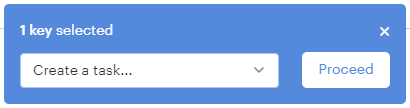
In the lower-left pop-up, choose Create a task and confirm.
The selection pop-up offers Create a task
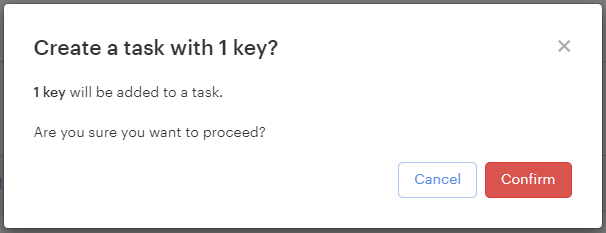
Confirm the keys going into the task
3
Set the task type
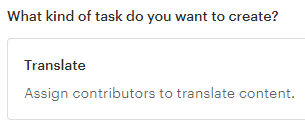
Set it to Translate. Review tasks are ignored.
Translate, not Review
4
Name the task
Optionally add {{tos_service_type: <name>}} to the Description. If omitted, the project description’s service type applies.
5
Select source and target languages
6
Assign the Translated user
Assign it directly, not through a group. Ideally it is the only contributor.
7
Lock translations, optional
Under Advanced options, if other providers share the project.
8
Create the task
The connector picks it up on the next poll.
Assigning through a group is the most common reason a task is never picked up. The connector looks for a direct assignment.
Continuous localisation
Nothing to request. On each poll the connector ingests new keys with a source value and an empty target in a supported language, and existing keys whose source has changed.To exclude languages, add this to the project description, using Lokalise language codes:
{{tos_exclude: code1,code2}}
Invalid codes are skipped silently, so check your spelling. The flag is ignored outside continuous mode.
Following progress
In software projects, each key carries TOS_IN_PROGRESS_<language> during translation and TOS_TRANSLATED_<language> after delivery. Document projects have no tags.In TranslationOS, search the Requests or Content views:
ID
Task mode
Continuous mode
Content ID
Translation ID and key name
Translation ID and key name
Order ID
Task name
Project name
Order group ID
Task ID
Team ID
Receiving translations
Delivery respects what happened while translation was running. Verified and reviewed translations are never overwritten; the in-progress tag stays on those keys so you can see what was held back.Translations are always saved to the project’s translation memory.
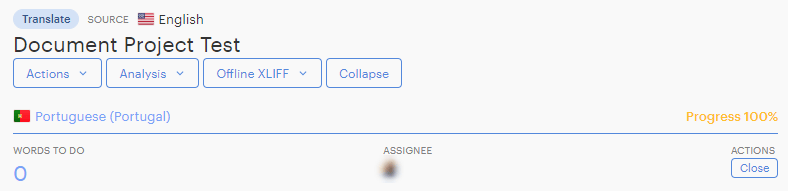
Task progress in a document project
Cancelling
Requests in the queue can be cancelled on the TranslationOS dashboards. Everything else goes through your project manager.
Troubleshooting
A task was never picked up
Check the Translated user is assigned directly rather than through a group, the task type is Translate, and the project is not in continuous mode. Tasks in continuous projects are ignored.
Keys in a continuous project were skipped
The connector ingests keys that are new with a source value and an empty target, or whose source changed. Verified keys and keys with empty sources are skipped by design.
A language is not being translated
Check it is not in a {{tos_exclude:}} flag, and that its code is valid. Invalid codes in that flag fail silently. See Language codes.
Plurals came back wrong
ICU pluralisation is handled correctly only for languages with two plural forms. Raise other cases with Translated.
Translations were not written
Check whether the target was verified or reviewed. Those are never overwritten.
FAQ
Are screenshots supported?
Yes. They are shown to translators in Matecat.
How do we give instructions to translators?
Add comments at key level and ask Translated to enable comment retrieval. Only the first ten comments per key are retrieved.
Is context sent?
Yes. Key descriptions are ingested.
Does branching work?
Yes. Task mode processes assigned tasks in all branches. Continuous mode processes only the branch named in {{tos_branch:}}, defaulting to master.
What about archived keys?
In continuous mode they can be configured to be processed or ignored. Ask Translated.
A key already has the TOS_TRANSLATED label. Will it be ingested again?
Yes, if you add it to a new task. Task mode keys on the task ID, not the label.
{"docsConfig":{"theme":"mint","$schema":"https://mintlify.com/docs.json","name":"TranslationOS","colors":{"primary":"#2985EC","light":"#94C5FE","dark":"#0055B8"},"logo":{"light":"https://mintcdn.com/translated/A02MktdeiyJy_IDR/logo/translationos-help-light.png?fit=max\u0026auto=format\u0026n=A02MktdeiyJy_IDR\u0026q=85\u0026s=3b0464b16c152c0abfc72c2f24658c24","dark":"https://mintcdn.com/translated/A02MktdeiyJy_IDR/logo/translationos-help-dark.png?fit=max\u0026auto=format\u0026n=A02MktdeiyJy_IDR\u0026q=85\u0026s=bb054a81131ba466f71d9e3623ac5668","href":"/"},"favicon":{"light":"https://mintcdn.com/translated/rjYQ9-wgKIB21Erw/favicon.png?fit=max\u0026auto=format\u0026n=rjYQ9-wgKIB21Erw\u0026q=85\u0026s=49e26f94b6b943273a3dfb9f46ac80de","dark":"https://mintcdn.com/translated/rjYQ9-wgKIB21Erw/favicon-dark.png?fit=max\u0026auto=format\u0026n=rjYQ9-wgKIB21Erw\u0026q=85\u0026s=0f36351171cd8606b04210f40c8d3d51"},"appearance":{"default":"system","strict":false},"background":{"color":{"light":"#FFFFFF","dark":"#161618"}},"navbar":{"primary":{"type":"button","label":"Open TranslationOS","href":"https://os.translated.com"}},"footer":{"socials":{"website":"https://translated.com","linkedin":"https://www.linkedin.com/company/translated"}},"fonts":{"heading":{"family":"Inter","weight":600},"body":{"family":"Inter"}},"styling":{"eyebrows":"section","codeblocks":{"theme":{"light":"github-light","dark":"github-dark"}},"latex":false},"integrations":{"posthog":{"apiKey":"phc_sXLZBnf2hsgtJDJp5pUbR4ebMMxDk6m7Gg4H5p2pHaCE","apiHost":"https://os-ba.translated.com","sessionRecording":true}},"navigation":{"global":{"anchors":[{"anchor":"API reference","icon":"code","href":"https://api.translated.com/v2"},{"anchor":"Support","icon":"life-ring","href":"https://support.os.translated.com/"}]},"pages":[]}},"deployment":{"deploymentMetadataValue":{"subdomain":"translated","hasAudioNarration":false,"actualSubdomain":"translated","customDomains":["help.os.translated.com"],"gitSource":{"type":"github","owner":"translated","repo":"enterprise-product","deployBranch":"main","contentDirectory":"","isPrivate":true,"mountPath":"","label":"","_id":"6afe0f347fc61c3a7233ce61"},"entitlements":{"AI_CHAT":{"status":"ENABLED"},"WEB_MCP":{"status":"ENABLED"},"NARRATION":{"status":"ENABLED"}},"buildId":"6b05bbece6cf07776d988517","clientVersion":"0.0.4304","searchFilterCounts":[{"language":"default","tag":"Connectors","count":63},{"language":"default","tag":"Documentation","count":24},{"language":"default","tag":"Content management systems","count":15},{"language":"default","tag":"Translation management","count":12},{"language":"default","tag":"Marketing and messaging","count":12},{"language":"default","tag":"Support and service","count":9},{"language":"default","tag":"The platform","count":9},{"language":"default","tag":"Design and forms","count":7},{"language":"default","tag":"Start here","count":7},{"language":"default","tag":"About connectors","count":5}],"searchSettings":{"fullPageSearch":true,"showContentSnippets":true,"isFiltersEnabled":true}},"assistantConfig":{"enableAskAiButton":false,"enableStarterQuestions":false,"enableContextualStarterQuestions":false,"enableAskAiSearchBar":true},"basePath":"","hasChatPermissions":false,"hasWebMcpPermissions":true,"toggles":[{"name":"kill-isr","enabled":true,"variant":{"name":"disabled","enabled":false,"feature_enabled":true},"impressionData":false},{"name":"custom-rbac-roles","enabled":true,"variant":{"name":"disabled","enabled":false,"feature_enabled":true},"impressionData":false},{"name":"agent-mintlify-slack","enabled":true,"variant":{"name":"disabled","enabled":false,"feature_enabled":true},"impressionData":false},{"name":"agent-integrations-settings","enabled":true,"variant":{"name":"disabled","enabled":false,"feature_enabled":true},"impressionData":false},{"name":"rbac-expansion","enabled":true,"variant":{"name":"disabled","enabled":false,"feature_enabled":true},"impressionData":false},{"name":"automations-pr-grouping","enabled":true,"variant":{"name":"disabled","enabled":false,"feature_enabled":true},"impressionData":false},{"name":"custom-prefix","enabled":true,"variant":{"name":"disabled","enabled":false,"feature_enabled":true},"impressionData":false},{"name":"analytics-v7","enabled":true,"variant":{"name":"disabled","enabled":false,"feature_enabled":true},"impressionData":false},{"name":"user-flows-analytics","enabled":true,"variant":{"name":"disabled","enabled":false,"feature_enabled":true},"impressionData":false},{"name":"no-publish-flow","enabled":true,"variant":{"name":"disabled","enabled":false,"feature_enabled":true},"impressionData":false},{"name":"snapshot-serving-live","enabled":true,"variant":{"name":"disabled","enabled":false,"feature_enabled":true},"impressionData":false},{"name":"stripTemperatureMiddleware","enabled":true,"variant":{"name":"disabled","enabled":false,"feature_enabled":true},"impressionData":false},{"name":"support-platform-pylon-zendesk","enabled":true,"variant":{"name":"disabled","enabled":false,"feature_enabled":true},"impressionData":false},{"name":"snapshot-serving","enabled":true,"variant":{"name":"disabled","enabled":false,"feature_enabled":true},"impressionData":false},{"name":"instant-rollback","enabled":true,"variant":{"name":"disabled","enabled":false,"feature_enabled":true},"impressionData":false},{"name":"granular-notifications-server","enabled":true,"variant":{"name":"disabled","enabled":false,"feature_enabled":true},"impressionData":false},{"name":"granular-notifications","enabled":true,"variant":{"name":"disabled","enabled":false,"feature_enabled":true},"impressionData":false},{"name":"automations-fable","enabled":true,"variant":{"name":"disabled","enabled":false,"feature_enabled":true},"impressionData":false},{"name":"fixed-ai-action-pricing","enabled":true,"variant":{"name":"disabled","enabled":false,"feature_enabled":true},"impressionData":false},{"name":"site-roles","enabled":true,"variant":{"name":"disabled","enabled":false,"feature_enabled":true},"impressionData":false},{"name":"automation-resolve-merge-conflict","enabled":true,"variant":{"name":"disabled","enabled":false,"feature_enabled":true},"impressionData":false},{"name":"scoped-publishing","enabled":true,"variant":{"name":"disabled","enabled":false,"feature_enabled":true},"impressionData":false},{"name":"mintql","enabled":true,"variant":{"name":"disabled","enabled":false,"feature_enabled":true},"impressionData":false},{"name":"page-level-analytics","enabled":true,"variant":{"name":"disabled","enabled":false,"feature_enabled":true},"impressionData":false},{"name":"editor-version-history-v2","enabled":true,"variant":{"name":"disabled","enabled":false,"feature_enabled":true},"impressionData":false},{"name":"billing-page-v2","enabled":true,"variant":{"name":"disabled","enabled":false,"feature_enabled":true},"impressionData":false},{"name":"full-page-search","enabled":true,"variant":{"name":"disabled","enabled":false,"feature_enabled":true},"impressionData":false},{"name":"workspace-projects","enabled":true,"variant":{"name":"disabled","enabled":false,"feature_enabled":true},"impressionData":false},{"name":"fork-pr-previews","enabled":true,"variant":{"name":"disabled","enabled":false,"feature_enabled":true},"impressionData":false},{"name":"revalidation-jwt","enabled":true,"variant":{"name":"disabled","enabled":false,"feature_enabled":true},"impressionData":false},{"name":"hobby-abuse-scan","enabled":true,"variant":{"name":"disabled","enabled":false,"feature_enabled":true},"impressionData":false},{"name":"dashboard-inbox","enabled":true,"variant":{"name":"disabled","enabled":false,"feature_enabled":true},"impressionData":false},{"name":"turbopuffer-dual-write","enabled":true,"variant":{"name":"disabled","enabled":false,"feature_enabled":true},"impressionData":false},{"name":"approve-review-flow","enabled":true,"variant":{"name":"disabled","enabled":false,"feature_enabled":true},"impressionData":false},{"name":"editor-metadata","enabled":true,"variant":{"name":"disabled","enabled":false,"feature_enabled":true},"impressionData":false},{"name":"sso-setup-deadline-banner","enabled":true,"variant":{"name":"disabled","enabled":false,"feature_enabled":true},"impressionData":false},{"name":"turbopuffer-serve","enabled":true,"variant":{"name":"disabled","enabled":false,"feature_enabled":true},"impressionData":false},{"name":"live-agents","enabled":true,"variant":{"name":"disabled","enabled":false,"feature_enabled":true},"impressionData":false},{"name":"starter-pricing","enabled":true,"variant":{"name":"control","enabled":true,"payload":{"type":"string","value":"control"},"feature_enabled":true},"impressionData":false},{"name":"llms-txt-v2","enabled":true,"variant":{"name":"disabled","enabled":false,"feature_enabled":true},"impressionData":false},{"name":"wildcard-email-auth","enabled":true,"variant":{"name":"disabled","enabled":false,"feature_enabled":true},"impressionData":false}],"googleFontsInlined":false},"customCss":[{"filePath":"style.css","content":".tos-hero{background-image:linear-gradient(118deg, #0D02FC 0%, #0F43FB 45%, #029CFF 100%)}.tos-searchbox{box-shadow:0 10px 30px rgba(0, 12, 52, 0.18);transition:transform 120ms ease, box-shadow 120ms ease}.tos-searchbox:hover{transform:translateY(-1px);box-shadow:0 14px 36px rgba(0, 12, 52, 0.24)}html[data-current-path=\"/\"] #search-bar-entry{display:none}html.dark .tos-hero{background-image:linear-gradient(118deg, #0A17A8 0%, #0C31B0 45%, #0A72B0 100%)}html.dark .tos-searchbox{background:rgba(33, 33, 36, 0.80);color:#c9cdd4;box-shadow:0 10px 30px rgba(0, 0, 0, 0.35);backdrop-filter:blur(6px)}html.dark .tos-searchbox span{border-color:#3A3A40;color:#BDBDC3}html.dark main img{filter:brightness(0.9) contrast(0.98)}:root{--gray-50: 247 247 247;--gray-100: 238 238 239;--gray-200: 222 222 225;--gray-300: 189 189 195;--gray-400: 172 172 179;--gray-500: 151 151 159;--gray-600: 110 110 119;--gray-700: 58 58 64;--gray-800: 45 45 48;--gray-900: 33 33 36;--gray-950: 9 9 10}#sidebar,#navbar{background-color:rgb(var(--gray-50))}#sidebar{border-right:1px solid rgb(var(--gray-200))}html.dark #sidebar,html.dark #navbar{background-color:#09090a}html.dark #sidebar{border-right-color:#2d2d30}.card{background-color:rgb(var(--gray-50));border-color:rgb(var(--gray-200))}html.dark .card{background-color:#212124;border-color:#3a3a40}html.dark .accordion{background-color:#212124}.card,.accordion,.accordion-group,figure.frame{border-radius:0.75rem}pre{border-radius:0.625rem}html.dark .prose :where(p,li,td,blockquote,dd){color:rgb(208 208 213)}"}]}
{"page":{"pagePath":"connectors/lokalise/requesting-and-tracking","slug":"/connectors/lokalise/requesting-and-tracking","pageMetadata":{"title":"Requesting and tracking Lokalise translations","description":"Creating tasks, running continuous localisation, and following delivery","sidebarTitle":"Request and track","href":"/connectors/lokalise/requesting-and-tracking"},"description":{"compiledSource":"\"use strict\";\nconst {jsx: _jsx} = arguments[0];\nconst {useMDXComponents: _provideComponents} = arguments[0];\nfunction _createMdxContent(props) {\n const _components = {\n p: \"p\",\n ..._provideComponents(),\n ...props.components\n };\n return _jsx(_components.p, {\n children: \"Creating tasks, running continuous localisation, and following delivery\"\n });\n}\nfunction MDXContent(props = {}) {\n const {wrapper: MDXLayout} = {\n ..._provideComponents(),\n ...props.components\n };\n return MDXLayout ? _jsx(MDXLayout, {\n ...props,\n children: _jsx(_createMdxContent, {\n ...props\n })\n }) : _createMdxContent(props);\n}\nreturn {\n default: MDXContent\n};\n","frontmatter":{},"scope":{}},"pageType":"default","mdx":{"mdxSource":{"compiledSource":"\"use strict\";const{Fragment:_Fragment,jsx:_jsx,jsxs:_jsxs}=arguments[0];const{useMDXComponents:_provideComponents}=arguments[0];function _createMdxContent(props){const _components={a:`a`,code:`code`,p:`p`,pre:`pre`,span:`span`,strong:`strong`,tbody:`tbody`,td:`td`,th:`th`,thead:`thead`,tr:`tr`,..._provideComponents(),...props.components},{Accordion,AccordionGroup,CodeBlock,Frame,Heading,OptimizedImage,Step,Steps,Table,Warning}=_components;if(!Accordion)_missingMdxReference(`Accordion`,true);if(!AccordionGroup)_missingMdxReference(`AccordionGroup`,true);if(!CodeBlock)_missingMdxReference(`CodeBlock`,true);if(!Frame)_missingMdxReference(`Frame`,true);if(!Heading)_missingMdxReference(`Heading`,true);if(!OptimizedImage)_missingMdxReference(`OptimizedImage`,true);if(!Step)_missingMdxReference(`Step`,true);if(!Steps)_missingMdxReference(`Steps`,true);if(!Table)_missingMdxReference(`Table`,true);if(!Warning)_missingMdxReference(`Warning`,true);return _jsxs(_Fragment,{children:[_jsx(_components.p,{children:`For localisation managers and developers.`}),`\n`,_jsx(Heading,{level:`2`,id:`task-based-requests`,children:`Task-based requests`}),`\n`,_jsxs(Steps,{children:[_jsx(Step,{title:`Select the keys`,children:_jsx(_components.p,{children:`In a project that is not using continuous localisation.`})}),_jsxs(Step,{title:`Create a task`,children:[_jsxs(_components.p,{children:[`In the lower-left pop-up, choose `,_jsx(_components.strong,{children:`Create a task`}),` and confirm.`]}),_jsx(Frame,{caption:`The selection pop-up offers Create a task`,children:_jsx(OptimizedImage,{src:`https://mintcdn.com/translated/RmMl3eEGJd76FY8o/images/lokalise/create-task.png?fit=max\u0026auto=format\u0026n=RmMl3eEGJd76FY8o\u0026q=85\u0026s=93666b2bc056c1a5def88e6153b9f75d`,alt:`The Lokalise selection bar with the Create a task option`,\"data-og-width\":`410`,width:`410`,\"data-og-height\":`108`,height:`108`,\"data-path\":`images/lokalise/create-task.png`,\"data-optimize\":`true`,\"data-opv\":`3`,srcset:`https://mintcdn.com/translated/RmMl3eEGJd76FY8o/images/lokalise/create-task.png?w=280\u0026fit=max\u0026auto=format\u0026n=RmMl3eEGJd76FY8o\u0026q=85\u0026s=e96c97fdb73c9d7d30a1464c219df9c1 280w, https://mintcdn.com/translated/RmMl3eEGJd76FY8o/images/lokalise/create-task.png?w=560\u0026fit=max\u0026auto=format\u0026n=RmMl3eEGJd76FY8o\u0026q=85\u0026s=ee44e97ced8eaacdb89449a1e539bc4b 560w, https://mintcdn.com/translated/RmMl3eEGJd76FY8o/images/lokalise/create-task.png?w=840\u0026fit=max\u0026auto=format\u0026n=RmMl3eEGJd76FY8o\u0026q=85\u0026s=ba4d8ea255beb9870bcd9042de920f24 840w, https://mintcdn.com/translated/RmMl3eEGJd76FY8o/images/lokalise/create-task.png?w=1100\u0026fit=max\u0026auto=format\u0026n=RmMl3eEGJd76FY8o\u0026q=85\u0026s=e43533e10e7be5f67269b98bc4a00453 1100w, https://mintcdn.com/translated/RmMl3eEGJd76FY8o/images/lokalise/create-task.png?w=1650\u0026fit=max\u0026auto=format\u0026n=RmMl3eEGJd76FY8o\u0026q=85\u0026s=b6b4dc11bb2187ac2fcaab369b1b46e2 1650w, https://mintcdn.com/translated/RmMl3eEGJd76FY8o/images/lokalise/create-task.png?w=2500\u0026fit=max\u0026auto=format\u0026n=RmMl3eEGJd76FY8o\u0026q=85\u0026s=224b49ddcdab44e145578a186a8d194f 2500w`})}),_jsx(Frame,{caption:`Confirm the keys going into the task`,children:_jsx(OptimizedImage,{src:`https://mintcdn.com/translated/RmMl3eEGJd76FY8o/images/lokalise/confirm-task.png?fit=max\u0026auto=format\u0026n=RmMl3eEGJd76FY8o\u0026q=85\u0026s=619a80fc42ed3cfcb71cd758b3b889fa`,alt:`A confirmation dialog asking to create a task with one key`,\"data-og-width\":`606`,width:`606`,\"data-og-height\":`233`,height:`233`,\"data-path\":`images/lokalise/confirm-task.png`,\"data-optimize\":`true`,\"data-opv\":`3`,srcset:`https://mintcdn.com/translated/RmMl3eEGJd76FY8o/images/lokalise/confirm-task.png?w=280\u0026fit=max\u0026auto=format\u0026n=RmMl3eEGJd76FY8o\u0026q=85\u0026s=ccc1495416bbf8fbb07828cbc9b2c820 280w, https://mintcdn.com/translated/RmMl3eEGJd76FY8o/images/lokalise/confirm-task.png?w=560\u0026fit=max\u0026auto=format\u0026n=RmMl3eEGJd76FY8o\u0026q=85\u0026s=6f458cb7883ce2d5865dc262f50329a1 560w, https://mintcdn.com/translated/RmMl3eEGJd76FY8o/images/lokalise/confirm-task.png?w=840\u0026fit=max\u0026auto=format\u0026n=RmMl3eEGJd76FY8o\u0026q=85\u0026s=f35e612b07dcb00e43ddc38531591ab6 840w, https://mintcdn.com/translated/RmMl3eEGJd76FY8o/images/lokalise/confirm-task.png?w=1100\u0026fit=max\u0026auto=format\u0026n=RmMl3eEGJd76FY8o\u0026q=85\u0026s=1f06de3753089f14106e851ad6343e65 1100w, https://mintcdn.com/translated/RmMl3eEGJd76FY8o/images/lokalise/confirm-task.png?w=1650\u0026fit=max\u0026auto=format\u0026n=RmMl3eEGJd76FY8o\u0026q=85\u0026s=a204a69a1f96135f6095a6d6f3508e67 1650w, https://mintcdn.com/translated/RmMl3eEGJd76FY8o/images/lokalise/confirm-task.png?w=2500\u0026fit=max\u0026auto=format\u0026n=RmMl3eEGJd76FY8o\u0026q=85\u0026s=26a6ac21473581c4e2a23b5d7724d394 2500w`})})]}),_jsxs(Step,{title:`Set the task type`,children:[_jsxs(_components.p,{children:[`Set it to `,_jsx(_components.strong,{children:`Translate`}),`. Review tasks are ignored.`]}),_jsx(Frame,{caption:`Translate, not Review`,children:_jsx(OptimizedImage,{src:`https://mintcdn.com/translated/RmMl3eEGJd76FY8o/images/lokalise/task-type.png?fit=max\u0026auto=format\u0026n=RmMl3eEGJd76FY8o\u0026q=85\u0026s=b9547573ca37a38fc7864edda76b281a`,alt:`The task type chooser showing the Translate option`,\"data-og-width\":`305`,width:`305`,\"data-og-height\":`126`,height:`126`,\"data-path\":`images/lokalise/task-type.png`,\"data-optimize\":`true`,\"data-opv\":`3`,srcset:`https://mintcdn.com/translated/RmMl3eEGJd76FY8o/images/lokalise/task-type.png?w=280\u0026fit=max\u0026auto=format\u0026n=RmMl3eEGJd76FY8o\u0026q=85\u0026s=e0a07dd6b95865c5713b55e08e491307 280w, https://mintcdn.com/translated/RmMl3eEGJd76FY8o/images/lokalise/task-type.png?w=560\u0026fit=max\u0026auto=format\u0026n=RmMl3eEGJd76FY8o\u0026q=85\u0026s=cc604078dc2223eac8e2e6eab01aa517 560w, https://mintcdn.com/translated/RmMl3eEGJd76FY8o/images/lokalise/task-type.png?w=840\u0026fit=max\u0026auto=format\u0026n=RmMl3eEGJd76FY8o\u0026q=85\u0026s=9e857f9fbb48ccc2964f76fd9c5a40ac 840w, https://mintcdn.com/translated/RmMl3eEGJd76FY8o/images/lokalise/task-type.png?w=1100\u0026fit=max\u0026auto=format\u0026n=RmMl3eEGJd76FY8o\u0026q=85\u0026s=b0a6426c4d3b9c5e1989e0b2ce31d337 1100w, https://mintcdn.com/translated/RmMl3eEGJd76FY8o/images/lokalise/task-type.png?w=1650\u0026fit=max\u0026auto=format\u0026n=RmMl3eEGJd76FY8o\u0026q=85\u0026s=7cf56914e37b7bebbd248fd5a516eed2 1650w, https://mintcdn.com/translated/RmMl3eEGJd76FY8o/images/lokalise/task-type.png?w=2500\u0026fit=max\u0026auto=format\u0026n=RmMl3eEGJd76FY8o\u0026q=85\u0026s=a828b0f9bde581fce4b508ede33de5b3 2500w`})})]}),_jsx(Step,{title:`Name the task`,children:_jsxs(_components.p,{children:[`Optionally add `,_jsx(_components.code,{children:`{{tos_service_type: \u003cname>}}`}),` to the Description. If omitted, the project description’s service type applies.`]})}),_jsx(Step,{title:`Select source and target languages`}),_jsx(Step,{title:`Assign the Translated user`,children:_jsxs(_components.p,{children:[`Assign it `,_jsx(_components.strong,{children:`directly`}),`, not through a group. Ideally it is the only contributor.`]})}),_jsx(Step,{title:`Lock translations, optional`,children:_jsx(_components.p,{children:`Under Advanced options, if other providers share the project.`})}),_jsx(Step,{title:`Create the task`,children:_jsx(_components.p,{children:`The connector picks it up on the next poll.`})})]}),`\n`,_jsx(Warning,{children:_jsx(_components.p,{children:`Assigning through a group is the most common reason a task is never picked up. The connector looks for a direct assignment.`})}),`\n`,_jsx(Heading,{level:`2`,id:`continuous-localisation`,children:`Continuous localisation`}),`\n`,_jsx(_components.p,{children:`Nothing to request. On each poll the connector ingests new keys with a source value and an empty target in a supported language, and existing keys whose source has changed.`}),`\n`,_jsx(_components.p,{children:`To exclude languages, add this to the project description, using Lokalise language codes:`}),`\n`,_jsx(CodeBlock,{numberOfLines:`2`,language:`text`,children:_jsx(_components.pre,{className:`shiki shiki-themes github-light github-dark`,style:{backgroundColor:`#fff`,\"--shiki-dark-bg\":`#24292e`,color:`#24292e`,\"--shiki-dark\":`#e1e4e8`},language:`text`,children:_jsxs(_components.code,{language:`text`,numberOfLines:`2`,children:[_jsx(_components.span,{className:`line`,children:_jsx(_components.span,{children:`{{tos_exclude: code1,code2}}`})}),`\n`,_jsx(_components.span,{className:`line`,children:_jsx(_components.span,{})})]})})}),`\n`,_jsx(_components.p,{children:`Invalid codes are skipped silently, so check your spelling. The flag is ignored outside continuous mode.`}),`\n`,_jsx(Heading,{level:`2`,id:`following-progress`,children:`Following progress`}),`\n`,_jsxs(_components.p,{children:[`In software projects, each key carries `,_jsx(_components.code,{children:`TOS_IN_PROGRESS_\u003clanguage>`}),` during translation and `,_jsx(_components.code,{children:`TOS_TRANSLATED_\u003clanguage>`}),` after delivery. Document projects have no tags.`]}),`\n`,_jsxs(_components.p,{children:[`In TranslationOS, search the `,_jsx(_components.strong,{children:`Requests`}),` or `,_jsx(_components.strong,{children:`Content`}),` views:`]}),`\n`,_jsxs(Table,{children:[_jsx(_components.thead,{children:_jsxs(_components.tr,{children:[_jsx(_components.th,{children:`ID`}),_jsx(_components.th,{children:`Task mode`}),_jsx(_components.th,{children:`Continuous mode`})]})}),_jsxs(_components.tbody,{children:[_jsxs(_components.tr,{children:[_jsx(_components.td,{children:`Content ID`}),_jsx(_components.td,{children:`Translation ID and key name`}),_jsx(_components.td,{children:`Translation ID and key name`})]}),_jsxs(_components.tr,{children:[_jsx(_components.td,{children:`Order ID`}),_jsx(_components.td,{children:`Task name`}),_jsx(_components.td,{children:`Project name`})]}),_jsxs(_components.tr,{children:[_jsx(_components.td,{children:`Order group ID`}),_jsx(_components.td,{children:`Task ID`}),_jsx(_components.td,{children:`Team ID`})]})]})]}),`\n`,_jsx(Heading,{level:`2`,id:`receiving-translations`,children:`Receiving translations`}),`\n`,_jsx(_components.p,{children:`Delivery respects what happened while translation was running. Verified and reviewed translations are never overwritten; the in-progress tag stays on those keys so you can see what was held back.`}),`\n`,_jsx(_components.p,{children:`Translations are always saved to the project’s translation memory.`}),`\n`,_jsx(Frame,{caption:`Task progress in a document project`,children:_jsx(OptimizedImage,{src:`https://mintcdn.com/translated/A02MktdeiyJy_IDR/images/lokalise/task-progress.png?fit=max\u0026auto=format\u0026n=A02MktdeiyJy_IDR\u0026q=85\u0026s=389c419c89530f47a94b947a9cfd9e94`,alt:`A Lokalise task showing progress and assignee`,\"data-og-width\":`788`,width:`788`,\"data-og-height\":`191`,height:`191`,\"data-path\":`images/lokalise/task-progress.png`,\"data-optimize\":`true`,\"data-opv\":`3`,srcset:`https://mintcdn.com/translated/A02MktdeiyJy_IDR/images/lokalise/task-progress.png?w=280\u0026fit=max\u0026auto=format\u0026n=A02MktdeiyJy_IDR\u0026q=85\u0026s=5cad9c5728f928695fb6f2b4be7a8d6a 280w, https://mintcdn.com/translated/A02MktdeiyJy_IDR/images/lokalise/task-progress.png?w=560\u0026fit=max\u0026auto=format\u0026n=A02MktdeiyJy_IDR\u0026q=85\u0026s=5e6b46fe51f7cafe957045d977b6a8b9 560w, https://mintcdn.com/translated/A02MktdeiyJy_IDR/images/lokalise/task-progress.png?w=840\u0026fit=max\u0026auto=format\u0026n=A02MktdeiyJy_IDR\u0026q=85\u0026s=6d4f1aec790c63caa9cf8fbee6de4b9f 840w, https://mintcdn.com/translated/A02MktdeiyJy_IDR/images/lokalise/task-progress.png?w=1100\u0026fit=max\u0026auto=format\u0026n=A02MktdeiyJy_IDR\u0026q=85\u0026s=fd73da3ab0c21e1a9dc2ef3f8b6c466b 1100w, https://mintcdn.com/translated/A02MktdeiyJy_IDR/images/lokalise/task-progress.png?w=1650\u0026fit=max\u0026auto=format\u0026n=A02MktdeiyJy_IDR\u0026q=85\u0026s=cf68a08436319f0fc8379ce7bbd1fb08 1650w, https://mintcdn.com/translated/A02MktdeiyJy_IDR/images/lokalise/task-progress.png?w=2500\u0026fit=max\u0026auto=format\u0026n=A02MktdeiyJy_IDR\u0026q=85\u0026s=918aed2ce1387f55d4cc098fcd3b603d 2500w`})}),`\n`,_jsx(Heading,{level:`2`,id:`cancelling`,children:`Cancelling`}),`\n`,_jsx(_components.p,{children:`Requests in the queue can be cancelled on the TranslationOS dashboards. Everything else goes through your project manager.`}),`\n`,_jsx(Heading,{level:`2`,id:`troubleshooting`,children:`Troubleshooting`}),`\n`,_jsxs(AccordionGroup,{children:[_jsx(Accordion,{title:`A task was never picked up`,id:`a-task-was-never-picked-up`,children:_jsx(_components.p,{children:`Check the Translated user is assigned directly rather than through a group, the task type is Translate, and the project is not in continuous mode. Tasks in continuous projects are ignored.`})}),_jsx(Accordion,{title:`Keys in a continuous project were skipped`,id:`keys-in-a-continuous-project-were-skipped`,children:_jsx(_components.p,{children:`The connector ingests keys that are new with a source value and an empty target, or whose source changed. Verified keys and keys with empty sources are skipped by design.`})}),_jsx(Accordion,{title:`A language is not being translated`,id:`a-language-is-not-being-translated`,children:_jsxs(_components.p,{children:[`Check it is not in a `,_jsx(_components.code,{children:`{{tos_exclude:}}`}),` flag, and that its code is valid. Invalid codes in that flag fail silently. See `,_jsx(_components.a,{href:`/reference/language-codes`,children:`Language codes`}),`.`]})}),_jsx(Accordion,{title:`Plurals came back wrong`,id:`plurals-came-back-wrong`,children:_jsx(_components.p,{children:`ICU pluralisation is handled correctly only for languages with two plural forms. Raise other cases with Translated.`})}),_jsx(Accordion,{title:`Translations were not written`,id:`translations-were-not-written`,children:_jsx(_components.p,{children:`Check whether the target was verified or reviewed. Those are never overwritten.`})})]}),`\n`,_jsx(Heading,{level:`2`,id:`faq`,children:`FAQ`}),`\n`,_jsxs(AccordionGroup,{children:[_jsx(Accordion,{title:`Are screenshots supported?`,id:`are-screenshots-supported`,children:_jsx(_components.p,{children:`Yes. They are shown to translators in Matecat.`})}),_jsx(Accordion,{title:`How do we give instructions to translators?`,id:`how-do-we-give-instructions-to-translators`,children:_jsx(_components.p,{children:`Add comments at key level and ask Translated to enable comment retrieval. Only the first ten comments per key are retrieved.`})}),_jsx(Accordion,{title:`Is context sent?`,id:`is-context-sent`,children:_jsx(_components.p,{children:`Yes. Key descriptions are ingested.`})}),_jsx(Accordion,{title:`Does branching work?`,id:`does-branching-work`,children:_jsxs(_components.p,{children:[`Yes. Task mode processes assigned tasks in all branches. Continuous mode processes only the branch named in `,_jsx(_components.code,{children:`{{tos_branch:}}`}),`, defaulting to master.`]})}),_jsx(Accordion,{title:`What about archived keys?`,id:`what-about-archived-keys`,children:_jsx(_components.p,{children:`In continuous mode they can be configured to be processed or ignored. Ask Translated.`})}),_jsx(Accordion,{title:`A key already has the TOS_TRANSLATED label. Will it be ingested again?`,id:`a-key-already-has-the-tos-translated-label-will-it-be-ingested-again`,children:_jsx(_components.p,{children:`Yes, if you add it to a new task. Task mode keys on the task ID, not the label.`})})]})]})}function MDXContent(props={}){const{wrapper:MDXLayout}={..._provideComponents(),...props.components};return MDXLayout?_jsx(MDXLayout,{...props,children:_jsx(_createMdxContent,{...props})}):_createMdxContent(props)}return{default:MDXContent};function _missingMdxReference(id,component){throw new Error(`Expected `+(component?`component`:`object`)+\" `\"+id+\"` to be defined: you likely forgot to import, pass, or provide it.\")}","frontmatter":{},"scope":{"codeStyling":{"theme":{"light":"github-light","dark":"github-dark"}},"config":{},"pageMetadata":{"title":"Requesting and tracking Lokalise translations","description":"Creating tasks, running continuous localisation, and following delivery","sidebarTitle":"Request and track","href":"/connectors/lokalise/requesting-and-tracking"}}},"mdxSourceWithNoJs":null},"mdxExtracts":{"tableOfContents":[{"title":"Task-based requests","slug":"task-based-requests","depth":2,"children":[]},{"title":"Continuous localisation","slug":"continuous-localisation","depth":2,"children":[]},{"title":"Following progress","slug":"following-progress","depth":2,"children":[]},{"title":"Receiving translations","slug":"receiving-translations","depth":2,"children":[]},{"title":"Cancelling","slug":"cancelling","depth":2,"children":[]},{"title":"Troubleshooting","slug":"troubleshooting","depth":2,"children":[]},{"title":"FAQ","slug":"faq","depth":2,"children":[]}],"codeExamples":{}},"jsLinks":[],"subdomain":"translated","siteName":"TranslationOS","title":"Requesting and tracking Lokalise translations - TranslationOS","navMaps":{"firstHrefInVersion":{},"firstHrefInLanguage":{},"searchTabScopes":[{"tab":"Documentation"},{"tab":"Connectors"},{"tab":"Release notes"}]},"lastModified":"2026-11-19T13:29:24.002Z","originalFileLocation":"connectors/lokalise/requesting-and-tracking.mdx"},"headHtml":"\u003cscript data-mint-head>(function(){var d=document.documentElement,p=null;if(!p){try{p=localStorage.getItem(\"isDarkMode\")}catch(e){}if(p==='true')p='dark';else if(p==='false')p='light';if(p!=='light'\u0026\u0026p!=='dark'\u0026\u0026p!=='system')p=\"system\"}var r=p==='system'?(matchMedia(\"(prefers-color-scheme: dark)\").matches?'dark':'light'):p;d.classList.remove(r==='dark'?'light':'dark');d.classList.add(r);d.setAttribute(\"data-theme-preference\",p)})();\u003c/script>\u003cmeta data-mint-head name=\"description\" content=\"Creating tasks, running continuous localisation, and following delivery\">\u003cmeta data-mint-head name=\"application-name\" content=\"TranslationOS\">\u003cmeta data-mint-head name=\"generator\" content=\"Mintlify\">\u003clink data-mint-head rel=\"icon\" type=\"image/png\" sizes=\"192x192\" href=\"/mintlify-assets/_mintlify/favicons/translated/f2nJOOBu-XendKiC/_generated/favicon/android-chrome-192x192.png\" media=\"(prefers-color-scheme: light)\">\u003clink data-mint-head rel=\"apple-touch-icon\" type=\"image/png\" sizes=\"180x180\" href=\"/mintlify-assets/_mintlify/favicons/translated/f2nJOOBu-XendKiC/_generated/favicon/apple-touch-icon.png\">\u003clink data-mint-head rel=\"icon\" type=\"image/png\" sizes=\"16x16\" href=\"/mintlify-assets/_mintlify/favicons/translated/f2nJOOBu-XendKiC/_generated/favicon/favicon-16x16.png\" media=\"(prefers-color-scheme: light)\">\u003clink data-mint-head rel=\"icon\" type=\"image/png\" sizes=\"32x32\" href=\"/mintlify-assets/_mintlify/favicons/translated/f2nJOOBu-XendKiC/_generated/favicon/favicon-32x32.png\" media=\"(prefers-color-scheme: light)\">\u003clink data-mint-head rel=\"shortcut icon\" type=\"image/x-icon\" href=\"/mintlify-assets/_mintlify/favicons/translated/f2nJOOBu-XendKiC/_generated/favicon/favicon.ico\" media=\"(prefers-color-scheme: light)\">\u003clink data-mint-head rel=\"icon\" type=\"image/png\" sizes=\"192x192\" href=\"/mintlify-assets/_mintlify/favicons/translated/f2nJOOBu-XendKiC/_generated/favicon-dark/android-chrome-192x192.png\" media=\"(prefers-color-scheme: dark)\">\u003clink data-mint-head rel=\"icon\" type=\"image/png\" sizes=\"16x16\" href=\"/mintlify-assets/_mintlify/favicons/translated/f2nJOOBu-XendKiC/_generated/favicon-dark/favicon-16x16.png\" media=\"(prefers-color-scheme: dark)\">\u003clink data-mint-head rel=\"icon\" type=\"image/png\" sizes=\"32x32\" href=\"/mintlify-assets/_mintlify/favicons/translated/f2nJOOBu-XendKiC/_generated/favicon-dark/favicon-32x32.png\" media=\"(prefers-color-scheme: dark)\">\u003clink data-mint-head rel=\"shortcut icon\" type=\"image/x-icon\" href=\"/mintlify-assets/_mintlify/favicons/translated/f2nJOOBu-XendKiC/_generated/favicon-dark/favicon.ico\" media=\"(prefers-color-scheme: dark)\">\u003cmeta data-mint-head property=\"og:title\" content=\"Requesting and tracking Lokalise translations - TranslationOS\">\u003cmeta data-mint-head property=\"og:description\" content=\"Creating tasks, running continuous localisation, and following delivery\">\u003cmeta data-mint-head property=\"og:site_name\" content=\"TranslationOS\">\u003cmeta data-mint-head property=\"og:url\" content=\"https://help.os.translated.com/connectors/lokalise/requesting-and-tracking\">\u003cmeta data-mint-head property=\"og:type\" content=\"website\">\u003cmeta data-mint-head property=\"og:image\" content=\"https://translated.mintlify.site/_mintlify/api/og/v2?division=Lokalise\u0026amp;title=Requesting+and+tracking+Lokalise+translations\u0026amp;description=Creating+tasks%2C+running+continuous+localisation%2C+and+following+delivery\u0026amp;theme=976a3389b5a4c638a9342905\u0026amp;signature=5ec1c5bc712b8df9a4094ac25994b35bd5dc6a5798f7231d06769dccbf710cba\">\u003cmeta data-mint-head property=\"og:image:width\" content=\"1200\">\u003cmeta data-mint-head property=\"og:image:height\" content=\"630\">\u003cmeta data-mint-head name=\"twitter:card\" content=\"summary_large_image\">\u003cmeta data-mint-head name=\"twitter:title\" content=\"Requesting and tracking Lokalise translations - TranslationOS\">\u003cmeta data-mint-head name=\"twitter:description\" content=\"Creating tasks, running continuous localisation, and following delivery\">\u003cmeta data-mint-head name=\"twitter:image\" content=\"https://translated.mintlify.site/_mintlify/api/og/v2?division=Lokalise\u0026amp;title=Requesting+and+tracking+Lokalise+translations\u0026amp;description=Creating+tasks%2C+running+continuous+localisation%2C+and+following+delivery\u0026amp;theme=976a3389b5a4c638a9342905\u0026amp;signature=5ec1c5bc712b8df9a4094ac25994b35bd5dc6a5798f7231d06769dccbf710cba\">\u003cmeta data-mint-head name=\"twitter:image:width\" content=\"1200\">\u003cmeta data-mint-head name=\"twitter:image:height\" content=\"630\">\u003cmeta data-mint-head name=\"msapplication-config\" content=\"/mintlify-assets/_mintlify/favicons/translated/f2nJOOBu-XendKiC/_generated/favicon/browserconfig.xml\">\u003cmeta data-mint-head name=\"apple-mobile-web-app-title\" content=\"TranslationOS\">\u003cmeta data-mint-head name=\"msapplication-TileColor\" content=\"#2985EC\">\u003clink data-mint-head rel=\"canonical\" href=\"https://help.os.translated.com/connectors/lokalise/requesting-and-tracking\">\u003clink data-mint-head rel=\"alternate\" type=\"application/xml\" href=\"/sitemap.xml\">\u003clink data-mint-head rel=\"alternate\" type=\"text/markdown\" href=\"/connectors/lokalise/requesting-and-tracking.md\">\u003cscript data-mint-head type=\"application/ld+json\">{\"@context\":\"https://schema.org\",\"@graph\":[{\"@type\":\"Organization\",\"@id\":\"https://help.os.translated.com/#organization\",\"name\":\"TranslationOS\",\"url\":\"https://help.os.translated.com\",\"logo\":{\"@type\":\"ImageObject\",\"url\":\"https://mintcdn.com/translated/A02MktdeiyJy_IDR/logo/translationos-help-light.png?fit=max\u0026auto=format\u0026n=A02MktdeiyJy_IDR\u0026q=85\u0026s=3b0464b16c152c0abfc72c2f24658c24\"}},{\"@type\":\"WebSite\",\"@id\":\"https://help.os.translated.com#website\",\"name\":\"TranslationOS\",\"url\":\"https://help.os.translated.com\",\"publisher\":{\"@id\":\"https://help.os.translated.com/#organization\"}},{\"@type\":\"WebPage\",\"@id\":\"https://help.os.translated.com/connectors/lokalise/requesting-and-tracking#webpage\",\"url\":\"https://help.os.translated.com/connectors/lokalise/requesting-and-tracking\",\"name\":\"Requesting and tracking Lokalise translations\",\"description\":\"Creating tasks, running continuous localisation, and following delivery\",\"dateModified\":\"2026-11-19T13:29:24.002Z\",\"isPartOf\":{\"@id\":\"https://help.os.translated.com#website\"},\"breadcrumb\":{\"@id\":\"https://help.os.translated.com/connectors/lokalise/requesting-and-tracking#breadcrumb\"}},{\"@type\":\"BreadcrumbList\",\"@id\":\"https://help.os.translated.com/connectors/lokalise/requesting-and-tracking#breadcrumb\",\"itemListElement\":[{\"@type\":\"ListItem\",\"position\":1,\"name\":\"Translation management\",\"item\":\"https://help.os.translated.com/connectors/crowdin-enterprise/overview\"},{\"@type\":\"ListItem\",\"position\":2,\"name\":\"Lokalise\",\"item\":\"https://help.os.translated.com/connectors/lokalise/overview\"},{\"@type\":\"ListItem\",\"position\":3,\"name\":\"Requesting and tracking Lokalise translations\",\"item\":\"https://help.os.translated.com/connectors/lokalise/requesting-and-tracking\"}]},{\"@type\":[\"Article\",\"TechArticle\"],\"@id\":\"https://help.os.translated.com/connectors/lokalise/requesting-and-tracking#article\",\"headline\":\"Requesting and tracking Lokalise translations\",\"name\":\"Requesting and tracking Lokalise translations\",\"description\":\"Creating tasks, running continuous localisation, and following delivery\",\"url\":\"https://help.os.translated.com/connectors/lokalise/requesting-and-tracking\",\"mainEntityOfPage\":{\"@id\":\"https://help.os.translated.com/connectors/lokalise/requesting-and-tracking#webpage\"},\"dateModified\":\"2026-11-19T13:29:24.002Z\",\"publisher\":{\"@id\":\"https://help.os.translated.com/#organization\"},\"isPartOf\":{\"@id\":\"https://help.os.translated.com#website\"}}]}\u003c/script>\u003cscript data-mint-head type=\"application/ld+json\">{\"@context\":\"https://schema.org\",\"@type\":\"WebSite\",\"name\":\"TranslationOS\",\"publisher\":{\"@type\":\"Organization\",\"name\":\"TranslationOS\"},\"provider\":{\"@type\":\"Organization\",\"name\":\"Mintlify\",\"url\":\"https://mintlify.com\"}}\u003c/script>","agentPointerHref":"/connectors/lokalise/requesting-and-tracking.md","siteName":"TranslationOS","nav":{"global":{"anchors":[{"anchor":"API reference","icon":"code","href":"https://api.translated.com/v2"},{"anchor":"Support","icon":"life-ring","href":"https://support.os.translated.com/"}]},"tabs":[{"tab":"Documentation","pages":[{"title":"Documentation","href":""}]},{"tab":"Connectors","groups":[{"group":"About connectors","icon":"circle-info","pages":[{"title":"What connectors do","href":"/connectors/what-connectors-do"},{"title":"How connectors work","href":"/connectors/how-connectors-work"},{"title":"Choosing a connector","href":"/connectors/choosing-a-connector"},{"title":"All connectors","href":"/connectors/all-connectors"},{"title":"Requesting a connector","href":"/connectors/requesting-a-connector"}]},{"group":"Content management systems","icon":"layer-group","pages":[{"group":"Adobe Experience Manager","expanded":false,"pages":[{"title":"Adobe Experience Manager connector","sidebarTitle":"Overview","href":"/connectors/adobe-aem/overview"},{"title":"Setting up the Adobe Experience Manager connector","sidebarTitle":"Set up","href":"/connectors/adobe-aem/setup"},{"title":"Requesting and tracking Adobe Experience Manager translations","sidebarTitle":"Request and track","href":"/connectors/adobe-aem/requesting-and-tracking"}]},{"group":"Contentful","expanded":false,"pages":[{"title":"Contentful connector","sidebarTitle":"Overview","href":"/connectors/contentful/overview"},{"title":"Setting up the Contentful connector","sidebarTitle":"Set up","href":"/connectors/contentful/setup"},{"title":"Requesting and tracking Contentful translations","sidebarTitle":"Request and track","href":"/connectors/contentful/requesting-and-tracking"}]},{"group":"Contentstack","expanded":false,"pages":[{"title":"Contentstack connector","sidebarTitle":"Overview","href":"/connectors/contentstack/overview"},{"title":"Setting up the Contentstack connector","sidebarTitle":"Set up","href":"/connectors/contentstack/setup"},{"title":"Requesting and tracking Contentstack translations","sidebarTitle":"Request and track","href":"/connectors/contentstack/requesting-and-tracking"}]},{"group":"Sanity Studio","expanded":false,"pages":[{"title":"Sanity Studio connector","sidebarTitle":"Overview","href":"/connectors/sanity-studio/overview"},{"title":"Setting up the Sanity Studio connector","sidebarTitle":"Set up","href":"/connectors/sanity-studio/setup"},{"title":"Requesting and tracking Sanity translations","sidebarTitle":"Request and track","href":"/connectors/sanity-studio/requesting-and-tracking"}]},{"group":"WPML","expanded":false,"pages":[{"title":"WPML connector","sidebarTitle":"Overview","href":"/connectors/wpml/overview"},{"title":"Setting up the WPML connector","sidebarTitle":"Set up","href":"/connectors/wpml/setup"},{"title":"Requesting and tracking WPML translations","sidebarTitle":"Request and track","href":"/connectors/wpml/requesting-and-tracking"}]}]},{"group":"Code repositories","icon":"code-branch","pages":[{"group":"GitHub and GitLab","expanded":false,"pages":[{"title":"GitHub and GitLab connector","sidebarTitle":"Overview","href":"/connectors/github-gitlab/overview"},{"title":"Setting up the GitHub and GitLab connector","sidebarTitle":"Set up","href":"/connectors/github-gitlab/setup"},{"title":"Requesting and tracking repository translations","sidebarTitle":"Request and track","href":"/connectors/github-gitlab/requesting-and-tracking"}]}]},{"group":"Translation management","icon":"language","pages":[{"group":"Crowdin Enterprise","expanded":false,"pages":[{"title":"Crowdin Enterprise connector","sidebarTitle":"Overview","href":"/connectors/crowdin-enterprise/overview"},{"title":"Setting up the Crowdin Enterprise connector","sidebarTitle":"Set up","href":"/connectors/crowdin-enterprise/setup"},{"title":"Requesting and tracking Crowdin translations","sidebarTitle":"Request and track","href":"/connectors/crowdin-enterprise/requesting-and-tracking"}]},{"group":"Lokalise","expanded":false,"pages":[{"title":"Lokalise connector","sidebarTitle":"Overview","href":"/connectors/lokalise/overview"},{"title":"Setting up the Lokalise connector","description":"Adding the Translated user and configuring your projects","sidebarTitle":"Set up","href":"/connectors/lokalise/setup"},{"title":"Requesting and tracking Lokalise translations","sidebarTitle":"Request and track","href":"/connectors/lokalise/requesting-and-tracking"}]},{"group":"Phrase TMS","expanded":false,"pages":[{"title":"Phrase TMS connector","description":"What the Phrase TMS connector does and what you need before you start","sidebarTitle":"Overview","href":"/connectors/phrase-tms/overview"},{"title":"Setting up the Phrase TMS connector","sidebarTitle":"Set up","href":"/connectors/phrase-tms/setup"},{"title":"Requesting and tracking Phrase TMS translations","sidebarTitle":"Request and track","href":"/connectors/phrase-tms/requesting-and-tracking"}]},{"group":"XTM","expanded":false,"pages":[{"title":"XTM connector","sidebarTitle":"Overview","href":"/connectors/xtm/overview"},{"title":"Setting up the XTM connector","sidebarTitle":"Set up","href":"/connectors/xtm/setup"},{"title":"Requesting and tracking XTM translations","sidebarTitle":"Request and track","href":"/connectors/xtm/requesting-and-tracking"}]}]},{"group":"Marketing and messaging","icon":"bullhorn","pages":[{"group":"Iterable","expanded":false,"pages":[{"title":"Iterable connector","sidebarTitle":"Overview","href":"/connectors/iterable/overview"},{"title":"Setting up the Iterable connector","sidebarTitle":"Set up","href":"/connectors/iterable/setup"},{"title":"Requesting and tracking Iterable translations","sidebarTitle":"Request and track","href":"/connectors/iterable/requesting-and-tracking"}]},{"group":"Marketo Engage","expanded":false,"pages":[{"title":"Marketo Engage connector","sidebarTitle":"Overview","href":"/connectors/marketo-engage/overview"},{"title":"Setting up the Marketo Engage connector","sidebarTitle":"Set up","href":"/connectors/marketo-engage/setup"},{"title":"Requesting and tracking Marketo Engage translations","sidebarTitle":"Request and track","href":"/connectors/marketo-engage/requesting-and-tracking"}]},{"group":"Salesforce Marketing Cloud","expanded":false,"pages":[{"title":"Salesforce Marketing Cloud connector","sidebarTitle":"Overview","href":"/connectors/salesforce-marketing-cloud/overview"},{"title":"Setting up the Salesforce Marketing Cloud connector","sidebarTitle":"Set up","href":"/connectors/salesforce-marketing-cloud/setup"},{"title":"Requesting and tracking Marketing Cloud translations","sidebarTitle":"Request and track","href":"/connectors/salesforce-marketing-cloud/requesting-and-tracking"}]},{"group":"SendGrid","expanded":false,"pages":[{"title":"SendGrid connector","sidebarTitle":"Overview","href":"/connectors/sendgrid/overview"},{"title":"Setting up the SendGrid connector","sidebarTitle":"Set up","href":"/connectors/sendgrid/setup"},{"title":"Requesting and tracking SendGrid translations","sidebarTitle":"Request and track","href":"/connectors/sendgrid/requesting-and-tracking"}]}]},{"group":"Support and service","icon":"headset","pages":[{"group":"Salesforce Knowledge","expanded":false,"pages":[{"title":"Salesforce Knowledge connector","sidebarTitle":"Overview","href":"/connectors/salesforce-knowledge/overview"},{"title":"Setting up the Salesforce Knowledge connector","sidebarTitle":"Set up","href":"/connectors/salesforce-knowledge/setup"},{"title":"Requesting and tracking Salesforce Knowledge translations","sidebarTitle":"Request and track","href":"/connectors/salesforce-knowledge/requesting-and-tracking"}]},{"group":"Zendesk","expanded":false,"pages":[{"title":"Zendesk connector","sidebarTitle":"Overview","href":"/connectors/zendesk/overview"},{"title":"Setting up the Zendesk connector","sidebarTitle":"Set up","href":"/connectors/zendesk/setup"},{"title":"Requesting and tracking Zendesk translations","sidebarTitle":"Request and track","href":"/connectors/zendesk/requesting-and-tracking"}]},{"group":"Zendesk Intake Manager","expanded":false,"pages":[{"title":"Zendesk IM connector","sidebarTitle":"Overview","href":"/connectors/zendesk-im/overview"},{"title":"Setting up the Zendesk IM connector","sidebarTitle":"Set up","href":"/connectors/zendesk-im/setup"},{"title":"Requesting and tracking Zendesk IM translations","sidebarTitle":"Request and track","href":"/connectors/zendesk-im/requesting-and-tracking"}]}]},{"group":"Design and forms","icon":"pen-ruler","pages":[{"group":"Figma","expanded":false,"pages":[{"title":"Figma plugin","sidebarTitle":"Overview","href":"/connectors/figma/overview"},{"title":"Setting up the Figma plugin","sidebarTitle":"Set up","href":"/connectors/figma/setup"},{"title":"Requesting and tracking Figma translations","sidebarTitle":"Request and track","href":"/connectors/figma/requesting-and-tracking"}]},{"title":"Figma Buzz","sidebarTitle":"Figma Buzz","href":"/connectors/figma-buzz/overview"},{"group":"Typeform","expanded":false,"pages":[{"title":"Typeform connector","sidebarTitle":"Overview","href":"/connectors/typeform/overview"},{"title":"Setting up the Typeform connector","sidebarTitle":"Set up","href":"/connectors/typeform/setup"},{"title":"Requesting and tracking Typeform translations","sidebarTitle":"Request and track","href":"/connectors/typeform/requesting-and-tracking"}]}]}]},{"tab":"Release notes","pages":[{"title":"Release notes","href":"/changelog"}]}]},"basePath":"","title":"Requesting and tracking Lokalise translations - TranslationOS","deploymentId":"dpl_57NA6NKtrcUBhuxv6Tm2hAi21TK4","buildId":"dpl_57NA6NKtrcUBhuxv6Tm2hAi21TK4","dynamics":["07c022d89b","a74be98ba7"],"chunks":["Frame-C7yGukkT.js","DynamicMarkdown-XsrWkK-b.js","zoom-image-lightbox-C5J5Gw3i.js","lightbox-handle-r17bVUz3.js"]}